Auto Copy
插件截图
插件概述
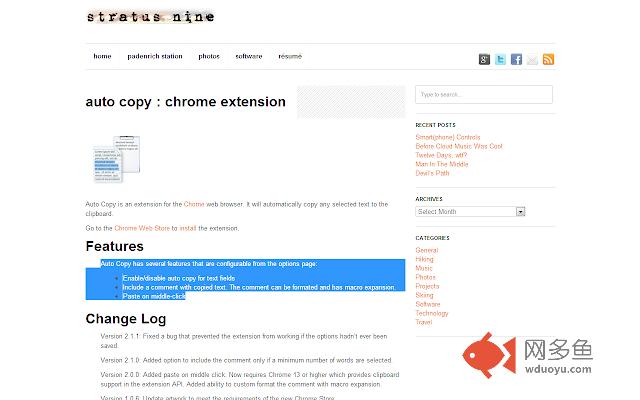
Automatically copy selected text to the clipboard. Has options for copying as plain text; including the URL in the copied text; etc.插件详情
When text is selected using the mouse it will automatically be copied to the clipboard.I've found that just about the only time I select text in my browser is when I want to copy it to the clipboard. This extension is meant to streamline the process.
Features:
- Enable/disable auto copy for text fields (v1.0.0)
- Enable/disable copy as plain text (v1.0.2)
- Enable/disable including URL with the copied text (v1.0.2)
- Implemented fix for beeping sound that some users were experiencing, thanks gregg! (v1.0.4)
- Implemented a work-around for Chrome 6 (v1.0.5)
- Updated artwork per Google's requirements (v1.0.6)
- Added paste on middle click capability. See extension options to enable (v2.0.0)
- Added ability to specify comment format which can optionally be added to copied text. See extension options to configure (v2.0.0)
- Added option to include the comment only if a minimum number of words are selected (v2.1.0)
- Fixed a bug that prevented the extension from working if the options hadn't been saved (v2.1.1)
- Added blacklist support (v3.0.0)
- Added blacklist support for URLs (v4.0.0)
- Added copy notify (v4.0.0)
- Added remove selection on copy (v4.0.0)
- Added copy as link (v4.0.0)
- Added ctrl/shift key to disable (v4.0.0)
- Updated paste on middle click handling (v4.0.0)
- Re-enabled support for copy with formatting (v4.0.0)
- Copy with comment and copy without formatting no longer rely on each other (v4.0.0)
- Added support to disable in content editable elements (v4.1.2)
- Added support to allow ctrl/shift to enable or disable the extension (v4.1.2)
- Added to manifest so extension can work on any url type (v4.1.2)
- Bug fix: auto copy would execute on text deselection, or clicking without selecting anything (v4.1.2)
- Bug fix: stopped multiple copies when double or triple clicking (v4.1.2)
- Bug fix: auto copy notification text unreadable on dark screens (v4.1.3)
- Bug fix: allowed for double click and drag (v4.1.3)
- Bug fix: Did not detect nested contentEditable elements (v4.1.4
- Eliminated delay on triple click (v4.1.4)
- Allow for alert on copy notice to be configurable (v4.1.4)
Go to the options screen to configure the features you'd like to use.
Note:
- This extension now works all URL types. In order for it to work with file:/// URLs you must check 'Allow access to file URLs' on the Chrome Extensions page. Content-scripts are automatically disabled in the Extension Gallery. Therefore, the extension will not work on this page or any page in the Gallery, so please test it on another page.
- Chrome version 22 or later is required to use this extension.
其他信息
官方唯一标识:bijpdibk****************pjaenfkg
官方最后更新日期:2018年1月25日
分类:生产工具
大小:21.36KiB
版本:4.1.4
语言:English
提供方:none
星级:3.5
插件下载
| 下载链接一 下载链接二 |
| Chrome插件离线安装教程 |
温馨提示
本站中的部份内容来源网络和网友发布,纯属个人收集并供大家交流学习参考之用,版权归版权原作者所有。
如果您发现网站上有侵犯您的知识产权的作品,请与我们取得联系,我们会及时修改或删除。
如果您觉得网多鱼对您有帮助,欢迎收藏我们 Ctrl+D。