Validity
插件截图
插件概述
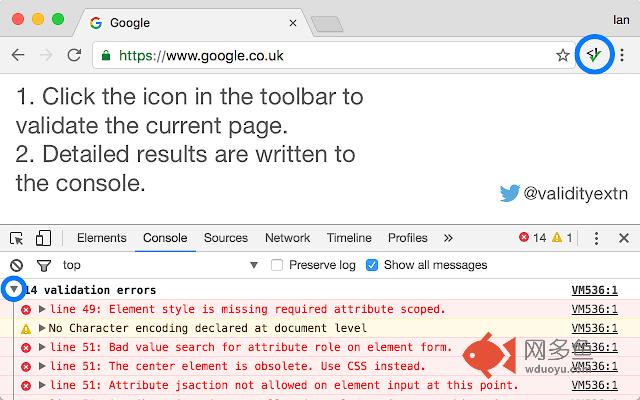
Click the icon in the address bar or press Alt+Shift+V to validate the current page. Results can be seen in Chrome's JS console.插件详情
Validity can be used to quickly validate your HTML documents from the toolbar.Just click the icon in the toolbar to validate the current document without leaving the page. The number of validation errors can be seen in the tool tip and the detail can be seen in the console tab of Chrome's developer tools.
Validity also gives you the option to use your own installation of the W3C Validation Service. (For more information on installing the W3C Validation Service see the documentation at http://validator.w3.org/docs/install.html).
*** PLEASE DO NOT POST BUG REPORTS AND FEATURE REQUESTS IN THE REVIEWS ON THIS PAGE as they are unlikely to be actioned, use the GitHub issue system instead (https://github.com/renyard/validity/issues). ***
Change Log:
4.0.0 (06/11/2016)
* Validity now uses the Nu Validator (https://validator.w3.org/nu/) by default.
* Added option to use legacy W3C Validator for custom instances.
3.3.1 (29/09/2016)
* Added developer info to options dialog.
3.3.0 (28/09/2016)
* Warnings are now shown for valid documents. (#70)
3.2.2 (23/08/2016)
* Changed default validator, due to breaking change in W3C hosted instance.
3.2.1 (07/08/2016)
* Corrected the default validator in the options UI.
3.2.0 (31/07/2016)
* Changed default validator to W3C hosted instance.
* Fixed #68 error pages (response other then 200) cannot be validated.
3.1.0 (17/01/2016)
* Suppressed the "This interface to HTML5 document checking is obsolete." message.
3.0.1 (26/04/2015)
* Changed the default validator to an instance run specifically for Validity.
* The validator uses SSL encryption by default, scoring an A on SSL Check (https://sslcheck.globalsign.com/en_GB/sslcheck/?host=html.validity.org.uk).
* The new validator instance should also fix the "Bad Gateway" errors, which are believed to be due to rate limiting on the W3C Validator.
2.0.2 (14/07/2014)
* Fixed a bug in loading the custom validator value on the options page.
2.0.1 (11/07/2014)
* Fixed a bug when the validator message contains a quote.
2.0.0 (09/07/2014)
* Support for Retina & high dpi displays.
* Regular expressions are now supported for host matching in options.
* The keyboard shortcut can now be changed via the "Keyboard shortcuts" dialog on the extension management page.
* Options are now synced via your Google or Opera Sync account.
* Regular expressions can now be used to match hosts.
* Rewrote the build script to use Grunt and include unit tests and linting.
1.3.0 (23/05/2013)
* Wildcards are now supported in specified and automatically validated hosts.
(Thanks to David Godfrey - https://github.com/ReactiveRaven)
1.2.4 (23/03/2012)
* Fixed bug with keyboard shortcut, introduced in 1.2.3.
* Restored default of true to collapse result option.
1.2.3 (14/03/2012)
* Collapse results option is now honoured.
1.2.2 (22/09/2011)
* No line is given when an error is not specific to a line.
* When one error is found, console output is no longer plural.
* An error is no longer thrown when a message contains a line break.
(Thanks to Mathieu Turcotte - https://github.com/MathieuTurcotte)
1.2.1 (17/08/2011):
* Fixed a bug where domains with hyphens were not recognised for auto validation and enabling for specific hosts.
(Thanks to Luke Armstrong - https://github.com/lukearmstrong)
1.2.0 (19/07/2011):
* HTTPS pages are now supported.
* More improvements to the Options UI.
* Reduced memory and CPU footprint.
1.1.0 (23/01/2011):
* Validator warnings are now displayed with errors in the console.
* Improvements to the options UI.
1.0.0 (13/11/2010):
* Complete rewrite.
* Supports installs of legacy versions of the W3C Validator commonly found in software repositories.
* Source code is now hosted on GitHub (https://github.com/renyard/validity).
0.3:
* Pages are now sent to the validator as a fragment, meaning that pages are not required to be accessible to the validator.
* Validation errors are now detailed in the Javascript console.
其他信息
官方唯一标识:bbicmjjb****************ilipgeif
官方最后更新日期:2016年11月11日
分类:开发者工具
大小:107KiB
版本:4.0.1
语言:English (UK)
提供方:validity.org.uk
星级:4
插件下载
| 下载链接一 下载链接二 |
| Chrome插件离线安装教程 |
温馨提示
本站中的部份内容来源网络和网友发布,纯属个人收集并供大家交流学习参考之用,版权归版权原作者所有。
如果您发现网站上有侵犯您的知识产权的作品,请与我们取得联系,我们会及时修改或删除。
如果您觉得网多鱼对您有帮助,欢迎收藏我们 Ctrl+D。