Disable JavaScript
插件截图
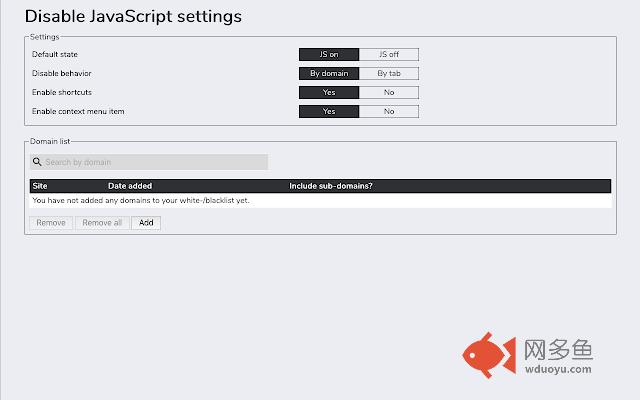
插件概述
Adds the ability to disable JavaScript on specific sites.插件详情
INTRODUCTIONThis web extension lets an user decide if JavaScript should be enabled or disabled for a given host or a given tab.
FEATURES
- Set the default state (JS on or JS off)
- Set the disable behavior (By domain or by tab)
- Use shortcuts (you can also disable this)
- Use a context menu item for toggling (you can also disable this)
- See your blacklisted/whitelisted domain list
- Add domains manually before visiting a site
- Add base domains that automatically enable/disable JS for sub domains
USAGE
When accessing e.g. google.com and disabling JavaScript, the web extension will block all JavaScript which otherwise would be loaded by google.com (including inline JS and external JS files from other hosts).
Please note that scripts from the blacklisted host will still be loaded if they're being loaded in another host (unless you block that host as well of course).
SUPPORTED BROWSERS
- Mozilla Firefox (Desktop & Firefox for Android)
- Google Chrome (Desktop)
WHY TO USE THIS WEB EXTENSION
The code is completely open source, you can also use the unpacked version of this web extension if you prefer.
No data of you will ever be logged and the web extension asks only for the permissions it really needs.
Pull requests are welcome!
FUTURE PLANS
You can see existing and add new feature proposals on the projects GitHub page (you can find the link in the about page of the web extension).
SUPPORT
If you need any assistance or find any bugs, feel free to contact me directly via email or use the support form in the web extension's chrome web store page.
其他信息
官方唯一标识:jfpdlihd****************hahieoem
官方最后更新日期:2018年9月27日
分类:开发者工具
大小:86.83KiB
版本:2.3.1
语言:English
提供方:none
星级:4.8
插件下载
| 下载链接一 下载链接二 |
| Chrome插件离线安装教程 |
温馨提示
本站中的部份内容来源网络和网友发布,纯属个人收集并供大家交流学习参考之用,版权归版权原作者所有。
如果您发现网站上有侵犯您的知识产权的作品,请与我们取得联系,我们会及时修改或删除。
如果您觉得网多鱼对您有帮助,欢迎收藏我们 Ctrl+D。