Live editor for CSS, Less & Sass - Magic CSS
插件截图
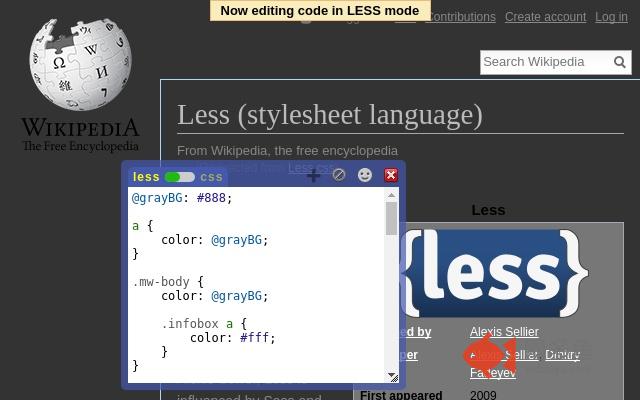
插件概述
Live preview of CSS/Less/Sass code with an in-page editor. Autocomplete, Less/Sass to CSS, beautify, minify, CSS reloader, lint, ...插件详情
Run this extension and start writing your CSS/Less/Sass code which gets applied immediately. The code you write will be saved in your browser's local storage at site level.Featuring:
* Live editor for CSS/Less/Sass code - Preview changes as you write code
* Option to reapply styles automatically
* Syntax Highlighting
* Auto-generate CSS selectors with point-and-click
* Autocomplete for CSS selectors, properties and values
* Emmet support helps in quickly expanding abbreviations to CSS code (https://docs.emmet.io/css-abbreviations/)
* Color picker (supports HEX, RGB, RGBA, HSL and HSLA)
* Convert code from Less/Sass to CSS
* Beautify / Format code
* Minify code
* Highlight DOM elements matching the CSS selectors
* CSS reloader
* Option to load this extension in iframes as well
* Lint CSS code
Open source:
* https://github.com/webextensions/live-css-editor
This extension is available for:
* Google Chrome
* Microsoft Edge
* Mozilla Firefox
* Opera
Visit https://webextensions.org/ for further details
Created by:
* Priyank Parashar
Uses:
* No need to refresh pages to test your CSS/Less/Sass code
* Speed-up development and testing of your styling code by doing it directly on your page
* Develop and test your code before finalizing your changes into the project files
* Apply some temporary styles (like hiding some components)
* Reload CSS resources without refreshing the page
* Test styling changes even when you cannot modify the original source code
Notes:
* The CSS/Less/Sass code you write gets applied as you write it
* The Sass parser is loaded remotely from https://cdnjs.cloudflare.com/ajax/libs/sass.js/...
* With this styling code tester, you can develop and test the code at the same time
* The code is saved in browser as soon as you write it
* The code editor is resizable and draggable
* The code you write is auto-saved at site level and can be used again for same or different pages
* You can use "TAB" key to indent your code
* Running Magic CSS again, while it is already loaded, will restore it to its original position and size
* Press "Esc" or click on close to hide it and run it again to continue making changes
* The code you write is added at the bottom of the tag of the active page
* It includes CSS/Less/Sass beautifier
* It includes CSS minifier
* It highlights the DOM elements matching the CSS selectors
* Use it along with your favorite Chrome/Edge/Firefox/Opera Developer tools
* You might find it useful in creating your custom themes for websites based on Stylish / Stylist
* This extension was previously known as "MagiCSS - Live CSS Editor"
Credits for open source code used by this extension:
* Amplify JS
* Browserify
* Code Mirror
* codemirror-colorpicker by easylogic @ GitHub
* Emmet codemirror-plugin by emmetio @ GitHub
* CSS Pretty
* CSSLint
* jQuery
* jQuery UI
* jQuery UI Touch Punch
* Less
* Mozilla Source Map
* SASS / SCSS
* Tooltipster
Inspirations:
* "Auto-generate CSS selectors with point-and-click" feature is partly inspired by the Chrome extensions SelectorGadget and Stylebot
Connect to us at:
* https://webextensions.org/
* https://github.com/webextensions/live-css-editor
* https://twitter.com/webextensions
* Priyank Parashar - https://linkedin.com/in/ParasharPriyank/
其他信息
官方唯一标识:ifhikkca****************omalapol
官方最后更新日期:2019年3月8日
分类:开发者工具
大小:510KiB
版本:7.0.7
语言:English
提供方:https://webextensions.org
星级:4.6
插件下载
| 下载链接一 下载链接二 |
| Chrome插件离线安装教程 |
温馨提示
本站中的部份内容来源网络和网友发布,纯属个人收集并供大家交流学习参考之用,版权归版权原作者所有。
如果您发现网站上有侵犯您的知识产权的作品,请与我们取得联系,我们会及时修改或删除。
如果您觉得网多鱼对您有帮助,欢迎收藏我们 Ctrl+D。