IPvFoo
插件截图
插件概述
Display the server IP address, with a realtime summary of IPv4, IPv6, and HTTPS information across all page elements.插件详情
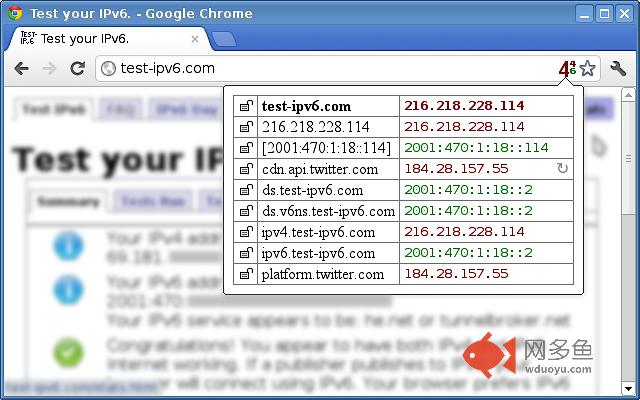
Here's one of the first extensions to use the new webRequest API in Chrome 17. It watches as the browser downloads a webpage, picks out various bits of protocol-related information, and squishes it down into a convenient table. Everything's captured and displayed privately, without creating any additional network traffic.The first thing you'll see is an icon in the location bar. A large 4 or 6 shows whether the outer page was fetched using IPv4 or IPv6. If the page contains elements from other domains, then smaller numbers will appear alongside for those.
When you click the icon, a table pops up, containing a row of information for each domain:
- A padlock icon, for HTTP, HTTPS, or a mix of both. This is helpful for tracking down mixed content warnings, but you shouldn't treat it as absolute security advice.
- The IPv4 or IPv6 address. If connections span more than one IP, then the most recent one wins. When the connection is still open, the address is highlighted in yellow.
- A "cached" symbol. This mainly exists to warn you that no actual connections took place, so the IP address might be stale.
- An "S" for WebSocket handshakes in Chrome 58+.
For convenient copying, clicking on a hostname or address will select it. There's also a right-click option to look up IP addresses with bgp.he.net. I'm not affiliated with that service, but it's my personal favorite.
IPvFoo is Free Software (Apache 2.0 license).
其他信息
官方唯一标识:ecanpceh****************olapggal
官方最后更新日期:2018年9月6日
分类:开发者工具
大小:24.41KiB
版本:1.43
语言:English
提供方:pmarks.net
星级:4.8
插件下载
| 下载链接一 下载链接二 |
| Chrome插件离线安装教程 |
温馨提示
本站中的部份内容来源网络和网友发布,纯属个人收集并供大家交流学习参考之用,版权归版权原作者所有。
如果您发现网站上有侵犯您的知识产权的作品,请与我们取得联系,我们会及时修改或删除。
如果您觉得网多鱼对您有帮助,欢迎收藏我们 Ctrl+D。