GTM Sonar
插件截图
插件概述
Debug your page template to see if it works with Google Tag Manager's auto-event listeners.插件详情
The GTM Sonar can be used to debug the page template and its compatibility with Google Tag Manager's listeners.TABLE OF CONTENTS
1. OVERVIEW
2. HOW TO USE IT
3. TO-DO
4. VERSION HISTORY
--------------------
1. OVERVIEW
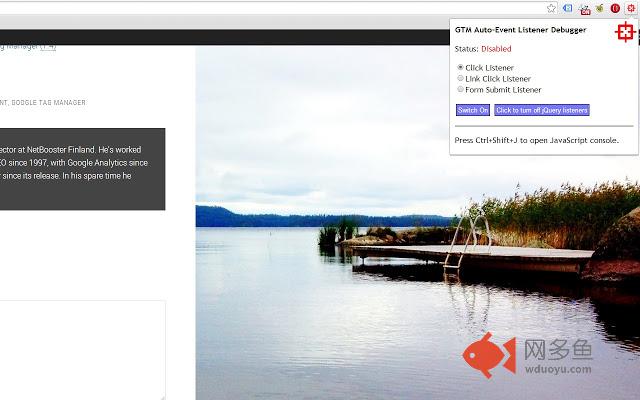
Once you install the extension (and reload your page), clicking the red target in the extension pane will open a pop-up.
In this pop-up, you can choose which listener to activate on the page.
Click Listener: Halts default action of all clicks on the document node, pushes gtm.click and other data into debugDL upon clicking on the page.
Link Click Listener: Halts default action of all clicks on the document node, pushes gtm.linkClick and other data into debugDL upon clicking any link element on the page.
Form Submit Listener: Halts default action of all form submissions, pushes gtm.formSubmit and other data into debugDL upon submitting a form.
By choosing the listener and clicking "Switch On" you set up the listener on the page. By opening the pop-up and clicking "Switch Off", you cancel all extension actions.
Once an event is pushed into the debugDL array, a small badge icon in the Browser Action increases in count, signifying the number of items in the array. To view contents of the array, open the JavaScript console in your Chrome browser and type "debugDL" (without quotes).
If your page has jQuery available, you can kill all jQuery binds by clicking the respective button. This is to test if jQuery is interfering with GTM listeners.
The debugger is tab-specific, so actions in a tab are for that tab only. Once you browse away from the page, debugDL will not be available any more.
Note that canceling the default action of clicks and submits is not 100 % accurate. You might have interfering scripts which make it so that redirection or submission happens anyway.
2. HOW TO USE IT
The idea is that you can test how different elements perform with these three GTM listeners without actually setting up a real GTM listener. This is good for debugging, as you can now test freely with your markup before setting up listener tags in GTM. This is also very useful if you want to debug a site where you don't have access to the container or a preview version.
3. TO-DO
1) Make more stable and robust
4. VERSION HISTORY
v1.3 - June 5, 2015
- Changed Click Listener to use Capture
- Changed Link Click Listener to climb through DOM tree until a link is found
v1.2 - June 1, 2014
- Added a badge icon which increases in count every time an event is pushed into debugDL
- Improved the pop-up instructions
- If the extension doesn't work, an error message will be displayed in the pop-up
- Changed the name of the extension to GTM Sonar (thanks Paul Gailey for the idea!)
v1.1 - May 26, 2014
- Added a popup to control debugger functions
- Added a switch to kill all jQuery binds
- Added the choice of Click Listener, Link Click Listener and Form Submit Listener
v1.0 - May 23, 2014
- First release version
- Clicking the Browser Action halts all click events and sets up the debugDL object
- Clicking anywhere on the page stores the gtm.click event in debugDL
- Clicking the Browser Action again removes all scripts and event handlers injected by this extension
其他信息
官方唯一标识:iiihoahk****************famcahcd
官方最后更新日期:2015年6月5日
分类:开发者工具
大小:11.11KiB
版本:1.3
语言:English
提供方:www.simoahava.com
星级:5
插件下载
| 下载链接一 下载链接二 |
| Chrome插件离线安装教程 |
温馨提示
本站中的部份内容来源网络和网友发布,纯属个人收集并供大家交流学习参考之用,版权归版权原作者所有。
如果您发现网站上有侵犯您的知识产权的作品,请与我们取得联系,我们会及时修改或删除。
如果您觉得网多鱼对您有帮助,欢迎收藏我们 Ctrl+D。