Dev Helper
插件截图
插件概述
Dev Helper插件详情
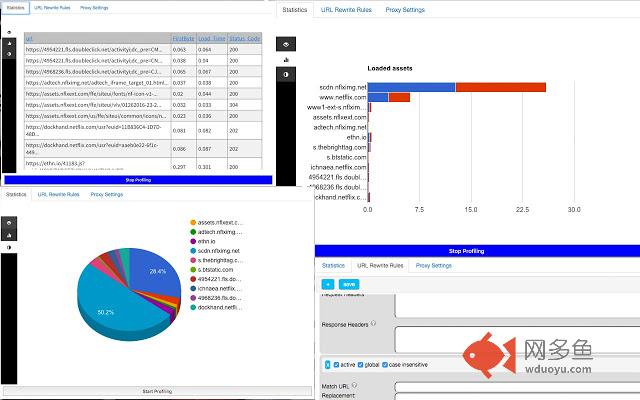
Dev helper is all in one development and profiling extension for Google Chrome which has the following features:- Profiling webpages and drawing charts showing loading time for all assets, split by domain (including time till the first byte received)
- Set up rewrite rules to override request and response urls, allowing developers to test without actually deploy new code.
Developers could override, add or replace request and response headers to test different scenarios. For example adding 'Access-Control-Allow-Origin: *' in the response header section will resolve cross domain script blocking.
- setting up rewrite rules to load assets from different locations.
For example a developer could write a regular expression pattern to match all JavaScript files in particular website where he/she is working on, and load them from their local host. This way active development could be done in real time, and new features could be tested before deploying to production. This method is also useful to debug a production issues.
example: if developer wants to test how the new code will affect the production website: http://www.mysite.com where all Java Script comes from: http://mysite.com/scripts/all_java_script.js file, they could write a rule that will match 'http://mysite.com/scripts/all_java_script.js' and load it from the localhost 'http://localhost/all_java_script.js'
- Setting proxy rules that match different Regular expression patterns.
Developers could write different matching patterns for different proxy rules.
- Script injection allowing to add new CSS or Java Script to a website for testing purposes.
Detailed instructions and examples of how to use it could be found here: https://www.toni-develops.com/a-homepage-section/projects/using-dev-helper-chrome-extension-for-local-development/
其他信息
官方唯一标识:kbbgddcn****************omcohlcc
官方最后更新日期:2018年10月15日
分类:开发者工具
大小:89.47KiB
版本:2.2
语言:English
提供方:none
星级:5
插件下载
| 下载链接一 下载链接二 |
| Chrome插件离线安装教程 |
温馨提示
本站中的部份内容来源网络和网友发布,纯属个人收集并供大家交流学习参考之用,版权归版权原作者所有。
如果您发现网站上有侵犯您的知识产权的作品,请与我们取得联系,我们会及时修改或删除。
如果您觉得网多鱼对您有帮助,欢迎收藏我们 Ctrl+D。