CSS Selector Helper for Chrome™
插件截图
插件概述
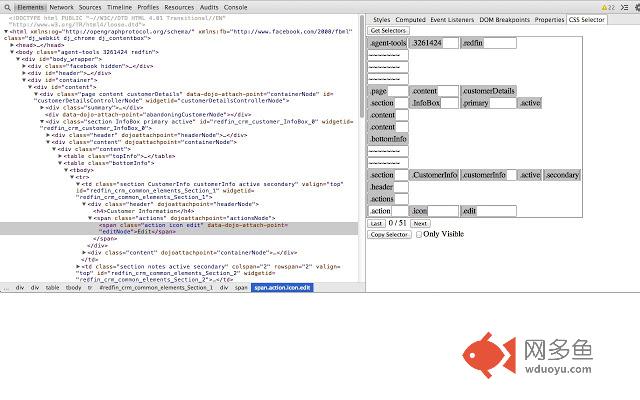
Dev Tools sidebar that aids finding unique CSS selectors for Selenium WebDriver tests.插件详情
CSS Selector Helper for Chrome™ makes finding the right CSS selector on a web page much quicker and easier than digging through the HTML. Unlike other tools meant to help you locate CSS selectors, this extension allows you to choose the selectors manually, so that they can match up better with the structure of the page as it was designed.To use CSS Selector Helper for Chrome™ follow these steps (also in the video):
1) Install the extension to your chrome browser.
2) Inspect an element on your page or select an element on the "Elements" page of the Dev tools.
3) Navigate to the "CSS Selector" tab on the sidebar of the "Elements" page of the Dev tools.
4) On this tab, you will see a list of element ID names and CSS classes, ordered from the most distant ancestor element on top, to the selected element on bottom. Click any of the items in this list to include it in the current selector.
5) Once the configured selector matches one or more items on the page, you can cycle through the elements by pressing the "Prev" and "Next" buttons.
6) When you have found your CSS selector*, click the "Selector to Clipboard" button to copy the complete and properly formatted selector.
7) To see the selectors of another element, just highlight it in the "Elements" panel, and click the"Get Classes" button.
*Note: You can check the "Only Visible" checkbox in order to only match elements Selenium Webdriver 2 considers "Visible" (according to this spec: http://www.w3.org/TR/webdriver/#determining-visibility).
其他信息
官方唯一标识:gddgcein****************lkbjodin
官方最后更新日期:2019年5月17日
分类:开发者工具
大小:21.77KiB
版本:1.9
语言:English
提供方:none
星级:3.8
插件下载
| 下载链接一 下载链接二 |
| Chrome插件离线安装教程 |
温馨提示
本站中的部份内容来源网络和网友发布,纯属个人收集并供大家交流学习参考之用,版权归版权原作者所有。
如果您发现网站上有侵犯您的知识产权的作品,请与我们取得联系,我们会及时修改或删除。
如果您觉得网多鱼对您有帮助,欢迎收藏我们 Ctrl+D。