boysenberry
插件截图
插件概述
quick and dirty dev tools插件详情
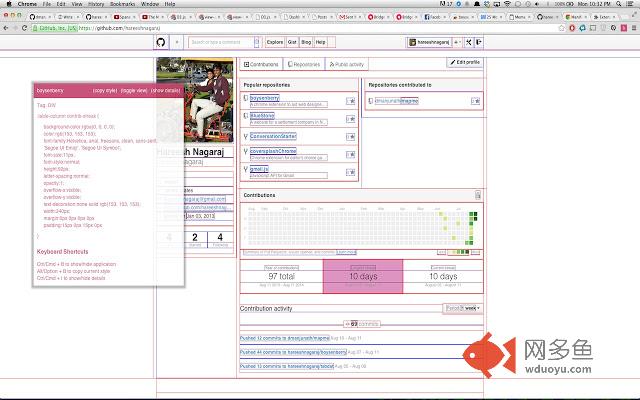
boysenberry is a lightweight version of the developer tools that allows you to quickly check out the layout of a page, and inspect the relevant CSS without having to open your developer tools. Most of the time, you just need to check out a few CSS attributes, and opening the dev tools is kind of a hassle. boysenberry also adds shortcuts to copy the style of an element, displays the layout bounds of all elements on a page, and lets you switch between basic and computed style with a few simple shortcuts.after installing, press Ctrl/Cmd + B, or click the icon on any page to activate!
Authors:
Hareesh Nagaraj https://github.com/hareeshnagaraj/
Dheeraj Manjunath https://github.com/dmanjunath
github:
https://github.com/hareeshnagaraj/boysenberry
其他信息
官方唯一标识:odddjldl****************kbpcdphh
官方最后更新日期:2014年8月13日
分类:开发者工具
大小:129KiB
版本:1.1
语言:English (United States)
提供方:none
星级:5
插件下载
| 下载链接一 下载链接二 |
| Chrome插件离线安装教程 |
温馨提示
本站中的部份内容来源网络和网友发布,纯属个人收集并供大家交流学习参考之用,版权归版权原作者所有。
如果您发现网站上有侵犯您的知识产权的作品,请与我们取得联系,我们会及时修改或删除。
如果您觉得网多鱼对您有帮助,欢迎收藏我们 Ctrl+D。