AngularJS Inspect Watchers
插件截图
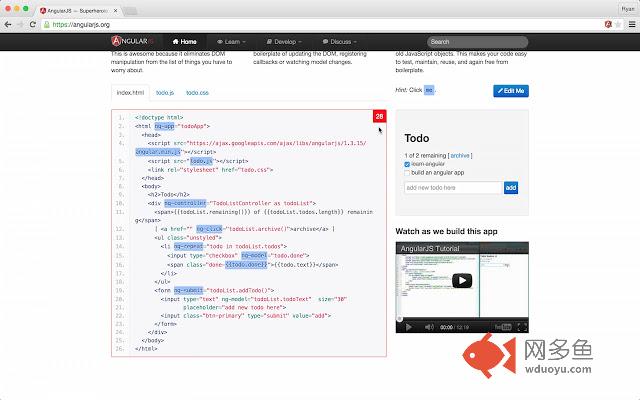
插件概述
Inspect the scope watchers of an Angular app插件详情
A Chrome extension that lets the user inspect the number of Angular watchers that exist on any element of an Angular app.***** 4/20/2015 Update!
I just released v1.0.0 of the extension, which moves the extension from a Browser Action to a Page Action (icon appears in the address bar). A Page Action is more appropriate for this extension because the features only makes sense for a few web pages, those with AngularJS running.
Usage:
Once installed, navigate to your Angular app and click the Page Action in the address bar to activate the extension. Then, hover your mouse over different sections of your Angular application to see the scopes and watchers highlighted in red. Click the Page Action again to deactivate.
Motivation:
It is a well known fact that as the number of watchers in an Angular app increases, the digest cycle performance decreases. In Angular 1.3, anything over 2,000 watchers will dramatically effect performance. This extension can help you easily monitor the number of watchers you are adding.
Troubleshooting
I don't see the Page Action! What do I do? --> Ng Inspect Watchers can only be used on AngularJS apps that have debug info enabled. If you navigate to any web page that is either not an AngularJS app, or does not have debug info enabled, you will not be able to use the extension.
How do I enable debug info? --> The extension relies on the presence of `.ng-scope` and `.ng-isolate-scope` CSS class names. If you have run `$compileProvider.debugInfoEnabled(false);` on your app, it won't work. To get the classes back, you can run `angular.reloadWithDebugInfo();` in the console and try again. See https://docs.angularjs.org/guide/production#disabling-debug-data for more info.
其他信息
官方唯一标识:gdfcinoa****************ahnmfkhg
官方最后更新日期:2015年7月26日
分类:开发者工具
大小:34.69KiB
版本:1.0.1
语言:English (United States)
提供方:ryanoglesby08.github.io
星级:3.2
插件下载
| 下载链接一 下载链接二 |
| Chrome插件离线安装教程 |
温馨提示
本站中的部份内容来源网络和网友发布,纯属个人收集并供大家交流学习参考之用,版权归版权原作者所有。
如果您发现网站上有侵犯您的知识产权的作品,请与我们取得联系,我们会及时修改或删除。
如果您觉得网多鱼对您有帮助,欢迎收藏我们 Ctrl+D。