Add Sense
插件截图
插件概述
Qlik Sense developer tool插件详情
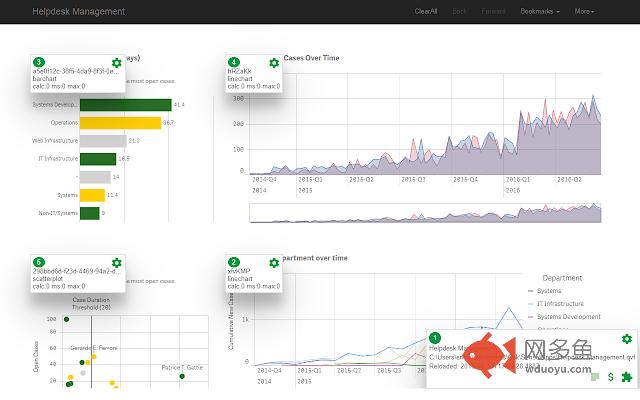
Add Sense adds Qlik Sense developer features to Chrome.Works both in Qlik Sense client and custom made web pages using Qlik Sense capabilities API. No changes to the app are needed.
Use for troubleshooting, exploring and to investigate performance.
Features include:
- show info like id, chart type and handle for objects on screen
- allows you to access object, sheet and app properties
- shows properties as JSON object or list in Qlik Sense patch format
- monitors calculation times
- show app properties and script (if accessible)
- lists extensions and charts used
- allows you to enable HTML select and copy
其他信息
官方唯一标识:bbiljflf****************pidgkejj
官方最后更新日期:2019年6月15日
分类:开发者工具
大小:68.27KiB
版本:1.1.0
语言:English
提供方:none
星级:5
插件下载
| 下载链接一 下载链接二 |
| Chrome插件离线安装教程 |
温馨提示
本站中的部份内容来源网络和网友发布,纯属个人收集并供大家交流学习参考之用,版权归版权原作者所有。
如果您发现网站上有侵犯您的知识产权的作品,请与我们取得联系,我们会及时修改或删除。
如果您觉得网多鱼对您有帮助,欢迎收藏我们 Ctrl+D。