VoiceIn
插件截图
插件概述
使用语音识别功能在任何文本框中的任何网站插件详情
With VoiceIn you can use speech recognition capabilities in ANY textbox on ANY website. VoiceIn uses Google's speech recognition engine, the most accurate Speech To Text technology available today to let you voice type into any website.After initial installation - it's recommended to close and reopen the browser, so it can work smoothly on all opened tabs.
There are two ways to start dictation:
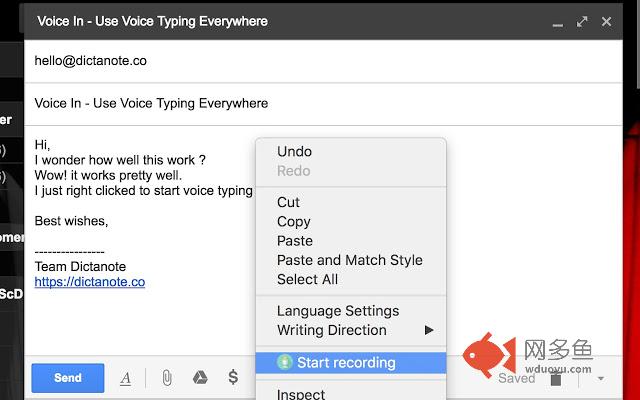
1) Simply place the mouse in the text-box, and then you can either right-click and choose Start-Recording from the popup menu, or,
2) Simply click on the extension's button right to the address bar. VoiceIn works silently in the background and is always on.
Default recognition language is English-US.
To switch language go to the app's options page on:
chrome-extension://pjnefijmagpdjfhhkpljicbbpicelgko/askforpermissions.html
First time - you'll need to give the extension microphone permissions.
** Note that the app is in Beta currently **
For dictating on Facebook, Stack Overflow, and some other specific websites, you might need to manually type in Space (using your keyboard) and only then start dictation. This is because these sites expects user's keyboard input.
Would love to hear your feedback! If a particular site does not work or you have feedback, email us at support@dictanote.co
Created with love by makers of Dictanote (https://dictanote.co).
其他信息
官方唯一标识:pjnefijm****************picelgko
官方最后更新日期:2019年6月2日
分类:生产工具
大小:286KiB
版本:0.2.29
语言:支持40种语言
提供方:https://dictanote.co
星级:3.8
插件下载
| 下载链接一 下载链接二 |
| Chrome插件离线安装教程 |
温馨提示
本站中的部份内容来源网络和网友发布,纯属个人收集并供大家交流学习参考之用,版权归版权原作者所有。
如果您发现网站上有侵犯您的知识产权的作品,请与我们取得联系,我们会及时修改或删除。
如果您觉得网多鱼对您有帮助,欢迎收藏我们 Ctrl+D。