Relatio
插件截图
插件概述
Save Selection to Dashboard’插件详情
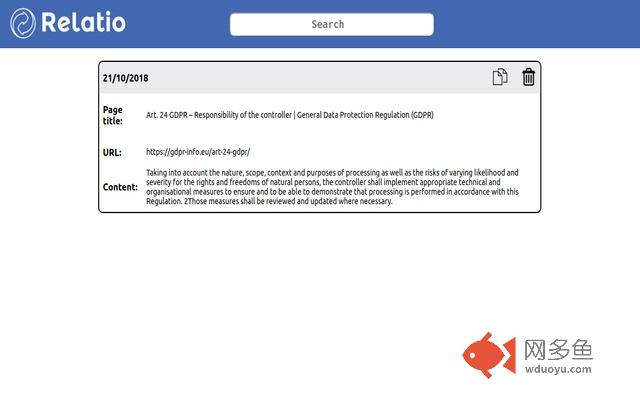
Relatio is a Chrome extension that allows you to copy highlighted text from a web page along with the page URL and title, all in one click, and save it to a cloud based private dashboard so it’s there for whenever you need it next. And when you do need it, you can copy it out with one click too.Think of it like a repository for every citation or reference you will ever need, right at your fingertips.
If you’re wondering why anyone would use this, think of an online content writer needing to cite sources for his claims or a product manager needing to reference various excerpts of different technical documentation. Imagine being able to do all of that, with just a few clicks.
The reality is no matter what we do for work, there are loads of commonly used sections of text we need to refer back to, and there is no easy or fast way to save and categorise them.
We’re aiming to build in features such as categories and tags in the dashboard and other features which will make the tool even more powerful, but first, we’ll need your feedback.
For this, we have a public roadmap accessible here: https://trello.com/b/87Xisb0A/relatio-public-roadmap. Please suggest new features and show your support for features already suggested on that roadmap because those are the features that we will build in for future releases.
INSTRUCTIONS FOR SETUP:
1. Immediately after download, click on the extension and select 'Save Selection to Dashboard'. This will open the dashboard where your selections will be saved.
2. Favourite this URL into your bookmarks for easy access.
INSTRUCTIONS FOR USE:
1. Copy the text you would like to save to your dashboard.
2. Click on the Relatio extension.
3. Check the Title, URL and Content field to ensure you have copied the details you want.
4. Click 'Save to Dashboard'.
5. The dashboard will open and your entry is now saved.
6. Click the 'copy' icon in the dashboard to copy your entry out (just the content, not the page title or URL) and click the 'delete' icon to delete the entry. This cannot be undone.
其他信息
官方唯一标识:adjollai****************bkjbejge
官方最后更新日期:2018年11月16日
分类:生产工具
大小:158KiB
版本:1.0
语言:English (UK)
提供方:none
星级:5
插件下载
| 下载链接一 下载链接二 |
| Chrome插件离线安装教程 |
温馨提示
本站中的部份内容来源网络和网友发布,纯属个人收集并供大家交流学习参考之用,版权归版权原作者所有。
如果您发现网站上有侵犯您的知识产权的作品,请与我们取得联系,我们会及时修改或删除。
如果您觉得网多鱼对您有帮助,欢迎收藏我们 Ctrl+D。