TeleGo
插件截图
插件概述
Dial Right From Your Browser插件详情
One Click to dial directly from your browser and integrate with a CRM!What’s new in version 2.2.1?
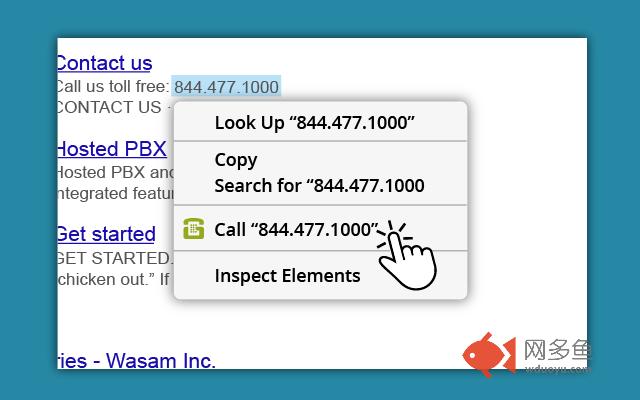
• One click to call any number that shows up on your Chrome browser
• Select a CRM to launch in the appropriate window when a caller calls in (including Whitepages, Google Search, Facebook, and Helpscout)
• Follow the call progress
• Review the Call Log (Incoming ↙, outgoing ↗, and missed calls ↵, including duration)
• Redial a phone number that shows up on the call log
• Select a CRM to launch in the appropriate window when a call comes in
TeleGo Click to Call will save you time and effort, allowing you to focus on growing your business and better serving your customers.
How does it work?
Once Click to Call extension has been updated or downloaded (make sure to relaunch the browser once downloaded), TeleGo’s G blue favicon will appear on the right corner next to the browser’s search field. Click on the icon and login* to reveal the click to call keypad as well as Recent Calls and Settings tabs.
*If you don’t know your login credentials contact us at support@telego.net and the TeleGo team will be happy to assist you.
For more information read the article at https://kb.telego.com/article/80-telego-chrome-extension.
This is a proprietary extension for TeleGo subscribers.
You may sign up for Telego at http://www.telego.com
其他信息
官方唯一标识:kahcgagh****************adnconjm
官方最后更新日期:2018年4月11日
分类:生产工具
大小:1.66MiB
版本:2.2.1
语言:English (United States)
提供方:none
星级:4.8
插件下载
| 下载链接一 下载链接二 |
| Chrome插件离线安装教程 |
温馨提示
本站中的部份内容来源网络和网友发布,纯属个人收集并供大家交流学习参考之用,版权归版权原作者所有。
如果您发现网站上有侵犯您的知识产权的作品,请与我们取得联系,我们会及时修改或删除。
如果您觉得网多鱼对您有帮助,欢迎收藏我们 Ctrl+D。