BÉPO
插件截图
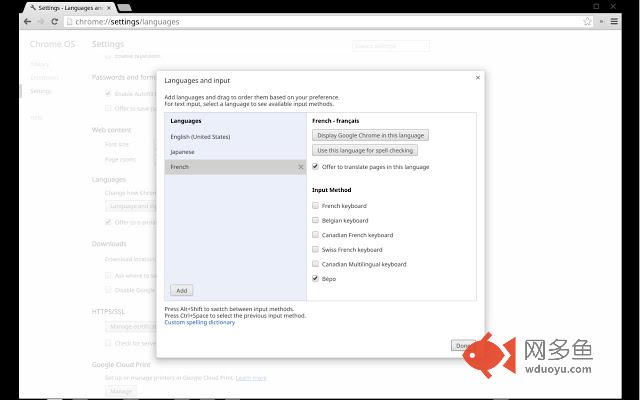
插件概述
Clavier Bépo插件详情
Cette extension ajoute un clavier bépo à Chrome OS.Comment activer: après avoir installé l'extension, ouvrez la page chrome://settings/languages et ajoutez la langue française, cochez l'option Bépo. Si cette option n'apparaît pas, déconnectez vous et recommencer la procédure.
En installant cette extension, vous acceptez les Conditions d’utilisation et les Règles de confidentialité décrites à https://www.google.com/intl/fr/policies/.
Problème: si le clavier ne fonctionne plus après avoir mis-à-jour Chrome OS (version 36), veuillez lire crbug.com/397143 pour réactiver le clavier.
[English]
This extension provides a bépo keyboard layout in Chrome OS. How to enable: after installing the extension, head over to chrome://settings/languages then add French, and check the Bépo option. If the option does not show up, sign out once and retry the procedure. Switch keyboard layouts with Alt+Shift until you hit the Bépo keyboard (symbol: FR*).
By installing this item, you agree to the Google Terms of Service and Privacy Policy at https://www.google.com/intl/en/policies/.
Known issue: if this stopped working after updating to M36 please see crbug.com/397143 for a workaround (Chrome OS 37+ should not be affected)
其他信息
官方唯一标识:pgiknkjj****************cgopgkgc
官方最后更新日期:2014年8月3日
分类:生产工具
大小:6.71KiB
版本:1.0
语言:Français
提供方:none
星级:4.9
插件下载
| 下载链接一 下载链接二 |
| Chrome插件离线安装教程 |
温馨提示
本站中的部份内容来源网络和网友发布,纯属个人收集并供大家交流学习参考之用,版权归版权原作者所有。
如果您发现网站上有侵犯您的知识产权的作品,请与我们取得联系,我们会及时修改或删除。
如果您觉得网多鱼对您有帮助,欢迎收藏我们 Ctrl+D。