Learn Mandarin With YouTube
插件截图
插件概述
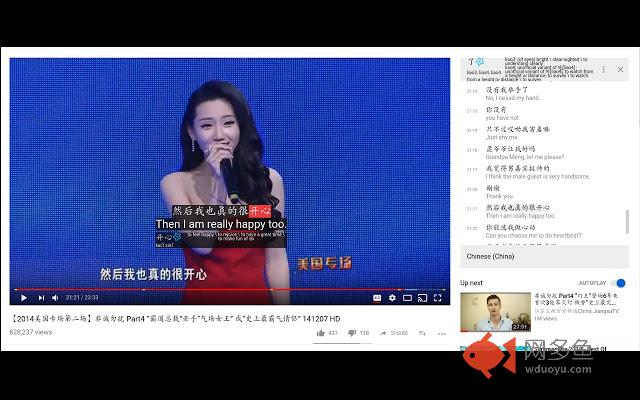
Learn Mandarin while watching YouTube videos!插件详情
I'm currently learning Mandarin and I wanted to stay motivated by watching whatever content that I wanted instead of the typical boring language tailored videos. So I created this extension to help me do that. This combination gives me quick feedback to improve my listening and reading skills.********** Features **********
* Dual subtitles. You can have both the Chinese and English (auto-translated) captions running on the same video.
* AnkiDroid Flashcards integration for Android devices. AnkiDroid Flashcards is a popular flashcard Android app. Via a support app, you can save words directly from the YouTube video to AnkiDroid Flashcards
* Enhances the transcript window, which is already available for most videos, by allowing quick definition look-ups and pinyin. It also in-lines Google's
auto English translations.
* Both Simplified and Traditional Chinese are supported.
***** Tips for finding content *****
Finding content on YouTube that already has Mandarin subtitles might be the hardest part. One of many ways to do this is:
1) Search for videos with with mandarin subs. You can do so buy adding 'mandarin subs' to your search term. Another way to do this is to do a search in Mandarin. If you haven't enabled your computer to input Mandarin characters, you can use Google Translate your search term to Chinese and then paste that in.
2) Then filter for "Subtitles/CC"
***** How to use this plugin *****
Once you have the video you want to watch. Open the transcript in the menu by clicking the 3 dots (...) below the video. ***Note: Opening the transcript also triggers the CC dual captions and definition highlights*** On transcript open, the Chinese will show and you can highlight over each word to get the definition.
********** Troubleshooting **********
* If you want to change the language(traditional to simplified for example), you need to do it via the CC on the video instead of the language toggle on the Transcript window. They are linked. The transcript window needs to stay open in order for captions to show.
* If you load the extension when the YouTube tab is already opened, then you need to refresh the tab in order for the extension to take effect.
********** Change History **********
1.2.3 Fixing bugs: In some videos, Mandarin captions were not being displayed
1.2.2 The AnkiDroid Importer app is now free!
1.2.1 Fixed a bug where captions fail to align correctly to timings for certain videos. Integration with updated AnkiDroid Importer app.
1.2.0 Enhanced captions. Dictionary lookups from hovering over the subtitles.
1.1.7 Fixing bug on initial load where hover does not show definition. Toggling the cc button is unnecessary now.
1.1.6 Adding AnkiDroid Flashcard integration.
1.1.3 Bug fix: Sometimes the English caption returned by YouTube is off by a millisecond. This causes the English transcript to be
**********
The CC-CEDICT Dictionary is used for translations which is licensed under a Creative Commons Attribution-Share Alike 3.0 License. See https://cc-cedict.org/wiki/ for details.
**********
其他信息
官方唯一标识:hhpfigjn****************mggmjecg
官方最后更新日期:2018年10月28日
分类:生产工具
大小:3.41MiB
版本:1.2.3
语言:English (United States)
提供方:none
星级:5
插件下载
| 下载链接一 下载链接二 |
| Chrome插件离线安装教程 |
温馨提示
本站中的部份内容来源网络和网友发布,纯属个人收集并供大家交流学习参考之用,版权归版权原作者所有。
如果您发现网站上有侵犯您的知识产权的作品,请与我们取得联系,我们会及时修改或删除。
如果您觉得网多鱼对您有帮助,欢迎收藏我们 Ctrl+D。