Cookie Keeper
插件截图
插件概述
Set domain rules for cookies you want to keep, all other cookies are deleted.插件详情
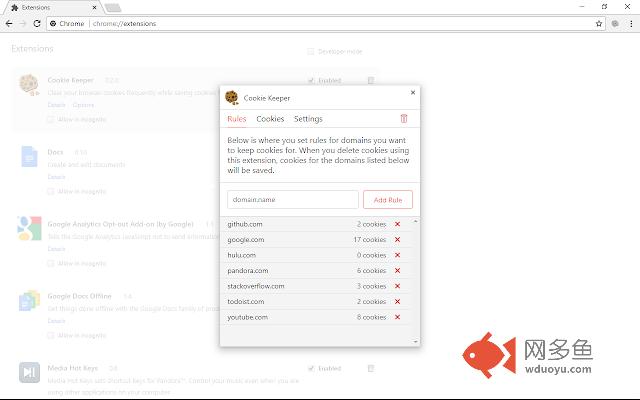
Cookie Keeper is a small utility that deletes cookies from domains that you don't want. To use the extension, open the options page and add new domains to the "rules" page for cookies you want to keep. Cookies for domains that are not included on the "rules" page will be deleted when you manually click on the trash icon inside the options page or if you enabled the automatic option to delete cookies.The extension is useful to keep you signed into sites you frequent while also deleting tracking cookies and other useless cookies from your browser.
## Accessing the Extension
To access the options page, click on the Cookie Keeper icon on your navigation bar, a menu will appear with the link to "Options." Another method is to visit chrome://extensions and click on the small "options" link under the Cookie Keeper extension.
## Adding Rules
You will want to create a new rule for each domain that has cookies you want to keep. Add a rule by opening the options page and on the "Rules" page enter the domain in the form. Cookies will not be deleted for the domain you enter and all of its sub-domains. For instance, if you enter "example.com", cookies from "www.example.com" and "sample.example.com" will not be deleted. This also applies to sub-domains but doesn't work in reverse.
You can also add rules by visiting the "Cookies" tab inside of the options window and pressing the "+" button next to the domain you want to add.
## Deleting Cookies by Domain
Cookie Keeper also gives you a quick way to delete cookies from specific domain names. Visit the "Cookies" page and scroll down or search (Ctrl + F) for the domain you want to delete cookies from. Click on the "X" button next to the listing to delete cookies for that specific domain.
## Required Permissions
When installing our extension, Chrome alerts you that this extension can access all sites and their data. This is required to delete and read cookies from every website. Our extension doesn't inject code into any website and doesn't track what websites you visit. We only use this permission to get a list of all of the cookies stored on your device and then delete them.
Chrome may also show that we require Storage and Browser Data permissions. The storage permission is used to save settings and rules that you have defined. The Browser Data permission is used when you enable the option to delete additional browser data.
If you enable the automatic delete notification option, the extension will request permission to display notifications. We will only display notifications when we are automatically deleting cookies. This permission will be revoked if you disable the feature.
其他信息
官方唯一标识:hkdjopjj****************fnmcnhof
官方最后更新日期:2019年3月4日
分类:生产工具
大小:36.97KiB
版本:0.2.4
语言:English
提供方:https://www.cirplex.com
星级:4.6
插件下载
| 下载链接一 下载链接二 |
| Chrome插件离线安装教程 |
温馨提示
本站中的部份内容来源网络和网友发布,纯属个人收集并供大家交流学习参考之用,版权归版权原作者所有。
如果您发现网站上有侵犯您的知识产权的作品,请与我们取得联系,我们会及时修改或删除。
如果您觉得网多鱼对您有帮助,欢迎收藏我们 Ctrl+D。