TTSReaderX In-Page Text to Speech
插件截图
插件概述
Read out loud any page, directly from within the page插件详情
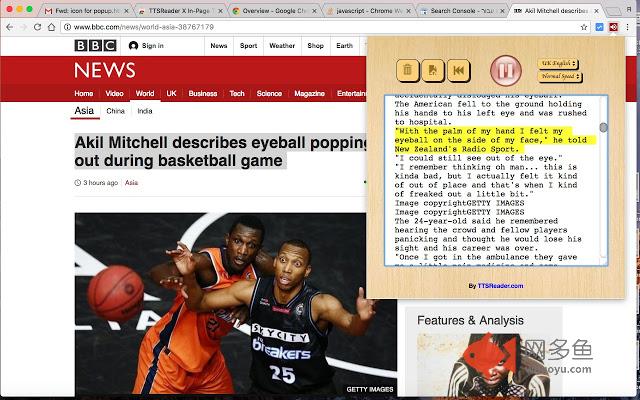
Enhance your Chrome with in-page speech capabilities.Listen to news, wiki articles & more, directly on their websites.
Reads any website, without having to copy text or leave the website.
NEW: keyboard shortcuts: play/pause by clicking shift+alt+downArrow
Including readability-mode. Transform your page to main-content-text only. Remove clutter - focus on the article. Together
with customizable font size and printer-friendly options.
Main Features:
Reading whole pages
Select text on the page -> right mouse click menu -> read selection
Edit the text to be read
Remembers text and caret position - so you can pause and later continue.
Marks the currently read sentence, so you can follow the reading.
Multilingual / accents.
all your website reading needs in a simple, efficient and intuitive manner! The extension is super simple to use and, a professional text to speech. The extension allows for instant reading of text with natural sounding voices, directly from within any website.
The extension's icon will be placed right on your Chrome's toolbar, so it will always be available without exiting your working tab. In addition, you can simply select the text you want to be read, and click "Speak" right from the popup context menu upon the right-mouse-click.
Full offline support
The ttsreader chrome extension has a set features and functionality that allow you to control and customize your listening experience.
• Choose a language (or accent) from a list.
• Control and vary dictation speeds
• Play and pause buttons
• Reset reader button
• Load/Reload page text
• Load the text into a textbox and follow with the assist of highlighted segments
• Hear text via selection and use of the right click menu!
• Listen and continue browsing on other sites.
Uses of the TTSreader extenstion:
• While working, listen to interesting articles and books
• TTSReader allows for listening to written content while doing something else.
• Educational for Kids
• Aid for people with difficulties in reading
• Narrating & dubbing movies, presentations & more
Ttsreader is particularly suited for content based websites, eg Wikipedia articles.
Privacy: We at TTSReader.com value your privacy, and that's why we do not store anything you type or any other data about you.
For additional info & feedback, please contact us at admin@speechlogger.com, For TTSReader for PCs, iOS (on Safari), desktops, laptops, go to http://ttsreader.com
Enjoy listening!
其他信息
官方唯一标识:pakknkle****************ofiekebg
官方最后更新日期:2018年11月8日
分类:生产工具
大小:1.16MiB
版本:1.32
语言:English
提供方:ttsreader.com
星级:3.9
插件下载
| 下载链接一 下载链接二 |
| Chrome插件离线安装教程 |
温馨提示
本站中的部份内容来源网络和网友发布,纯属个人收集并供大家交流学习参考之用,版权归版权原作者所有。
如果您发现网站上有侵犯您的知识产权的作品,请与我们取得联系,我们会及时修改或删除。
如果您觉得网多鱼对您有帮助,欢迎收藏我们 Ctrl+D。