Bookmarks HotList
插件截图
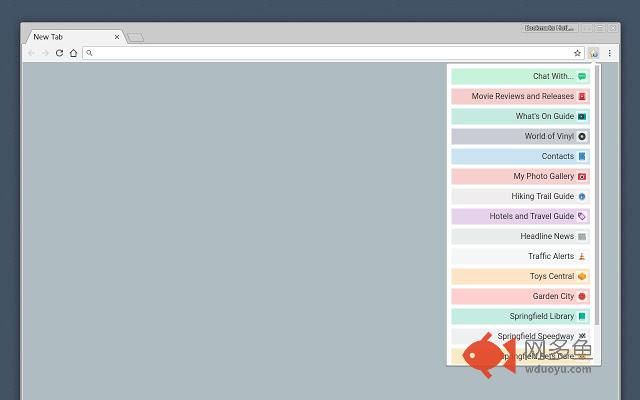
插件概述
A Speed Dial in your toolbar, with easy set-up and keyboard shortcuts插件详情
Set up your HotList in the Bookmark Manager, access it from the toolbar in a choice of layouts and colours.For keyboard access, the default shortcut to open the extension is Alt+B (or Command+B). To change the shortcut, paste this into the address bar: chrome://extensions/configureCommands
When the extension is open, shortcut keys (1-9 and A-Z) are available for each bookmark. Hold down the Space Bar to reveal hints.
Open multiple tabs: 1 click will open a bookmark in a background tab, but the Popup stays open. A 2nd click on that bookmark will close the Popup and activate the tab, or you can open other bookmarks instead.
Assurances:
The only automated modification to your bookmarks will be the creation of a new folder to contain those displayed by this extension, and a bookmark to get you started.
No personal data will be transferred across the internet. Configuration settings will be synced across all your computers if that is enabled in the browser.
Credits:
The Star icon is “Actions bookmark new list Icon” by Oxygen Team, available from Icon Archive under the GNU Lesser General Public License:
http://www.iconarchive.com/show/oxygen-icons-by-oxygen-icons.org/Actions-bookmark-new-list-icon.html
Icons used in promotional images are in the public domain and available from
http://paomedia.github.io/small-n-flat/
Changelog:
3.1.1 2019-02-14
Updated for new Chrome behaviour regarding bookmarklets.
其他信息
官方唯一标识:jnbabcce****************bpbgbham
官方最后更新日期:2019年2月14日
分类:生产工具
大小:292KiB
版本:3.1.1
语言:English
提供方:mythical5th.com
星级:4.4
插件下载
| 下载链接一 下载链接二 |
| Chrome插件离线安装教程 |
温馨提示
本站中的部份内容来源网络和网友发布,纯属个人收集并供大家交流学习参考之用,版权归版权原作者所有。
如果您发现网站上有侵犯您的知识产权的作品,请与我们取得联系,我们会及时修改或删除。
如果您觉得网多鱼对您有帮助,欢迎收藏我们 Ctrl+D。