Sucuri Sitecheck
插件截图
插件概述
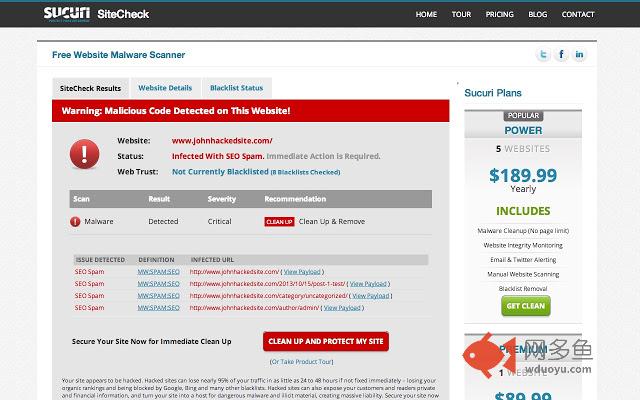
Scan any website for security issues, blacklisting, and malware with Sucuri SiteCheck插件详情
Are the websites you’re visiting every day safe for your computer? Is your own site safe for visitors, customers or readers to navigate? Stop wondering and find out. Sucuri SiteCheck will check any site on the internet (including your own) for malware, SPAM, blacklisting and other security issues like .htaccess redirects, hidden eval code, and more. The best thing about it? It’s completely free.You can also check any site on the web for malware, blacklisting, and overall security status by scanning it for free at SiteCheck.Sucuri.net. Go ahead. Give it a try quickly. We’ll wait a minute.
You back and ready to download our Chrome Extension? Great. Here are the details. Sucuri SiteCheck detects various types of malware, SPAM injections, website errors, disabled sites, database connection issues and code anomalies that require special attention including:
- Obfuscated JavaScript injections
- Cross Site Scripting (XSS)
- Website Defacements
- Hidden & Malicious iFrames
- PHP Mailers
- Phishing Attempts
- Malicious Redirects
- Anomalies
- Drive-by-Downloads
- IP Cloaking
- Social Engineering Attacks
There are a number of blacklisting authorities that monitor for malware, SPAM, and phishing attempts. Sucuri SiteCheck leverages the APIs for these authorities to check your website blacklisting status:
Sucuri
Google Safe Browsing
Norton
AVG
Phish Tank (Phishing Specifically)
ESET
McAfee SiteAdvisor
Yandex
Note that if a site you’re visiting is compromised, it could harm your personal computer. Please let the site owner know about the malware as quickly as possible. If your site is compromised and you need urgent help, you can leverage Sucuri and safeguard your site for the future - http://sucuri.net
其他信息
官方唯一标识:mclkkpli****************elpgjhji
官方最后更新日期:2014年4月4日
分类:开发者工具
大小:210KiB
版本:1.0.11
语言:English (United States)
提供方:none
星级:4.2
插件下载
| 下载链接一 下载链接二 |
| Chrome插件离线安装教程 |
温馨提示
本站中的部份内容来源网络和网友发布,纯属个人收集并供大家交流学习参考之用,版权归版权原作者所有。
如果您发现网站上有侵犯您的知识产权的作品,请与我们取得联系,我们会及时修改或删除。
如果您觉得网多鱼对您有帮助,欢迎收藏我们 Ctrl+D。