Run Force.com SOQL Paginated
插件截图
插件概述
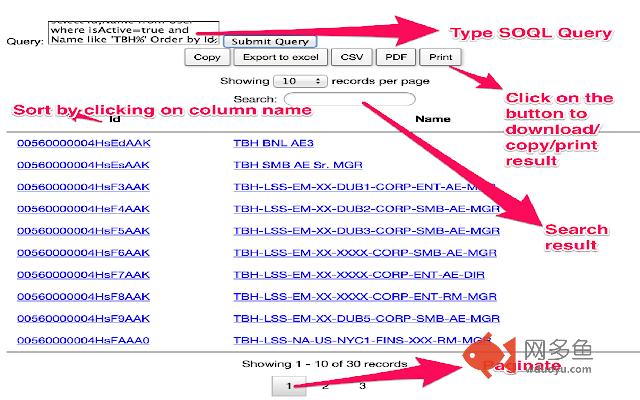
This extension allows you to query the currently logged in Force.com organization. Shows results with search-box and pagination插件详情
Please Note:** If the download as Excel/PDF not working please Mark "Always Allow" for Adobe flash player setting by clicking in the following link.
http://www.macromedia.com/support/documentation/en/flashplayer/help/settings_manager04.html
(This plugin uses swf for the download feature so if you have this setting as Always Deny or Always ask then it may not work)
Execute Force.com SOQL with Search-box and view the resultin a paginated view (https://sites.google.com/site/soqlpopupquery). This is a raw Google Chrome Extension which is created to support following functionalities: (Please refresh your salesforce browser screen prior to clicking on the Chrome extension Icon.):
1) Run Force.com SOQL queries runtime from browser by typing in the SOQL query in the query box->submit
2) View the result in a paginated format
3) You can also search within your result very quickly from your browser.
4) You can set the number of records to be viewed on every page.
5) You can sort a column in the result set
6) Click on xls, csv,pdf to download the result in the given format, copy to copy the result and print to print the result.
User needs to login to the Salesforce.com org in the browser or refresh the page if already logged-in before clicking on the Chrome extension. The chrome extension reads the session cookie and runs the query against the respective Salesforce.com org. There is no need to login again in the extension pop-up. Works well when you are working on multiple orgs and running the queries.
This is something I tried out to learn how to make a Chrome Extension, doesn't take care of errors/exceptions.
其他信息
官方唯一标识:jhgpiaof****************iilbmlio
官方最后更新日期:2017年1月16日
分类:开发者工具
大小:411KiB
版本:0.5
语言:English
提供方:none
星级:4.8
插件下载
| 下载链接一 下载链接二 |
| Chrome插件离线安装教程 |
温馨提示
本站中的部份内容来源网络和网友发布,纯属个人收集并供大家交流学习参考之用,版权归版权原作者所有。
如果您发现网站上有侵犯您的知识产权的作品,请与我们取得联系,我们会及时修改或删除。
如果您觉得网多鱼对您有帮助,欢迎收藏我们 Ctrl+D。