Qlik Sense Console
插件截图
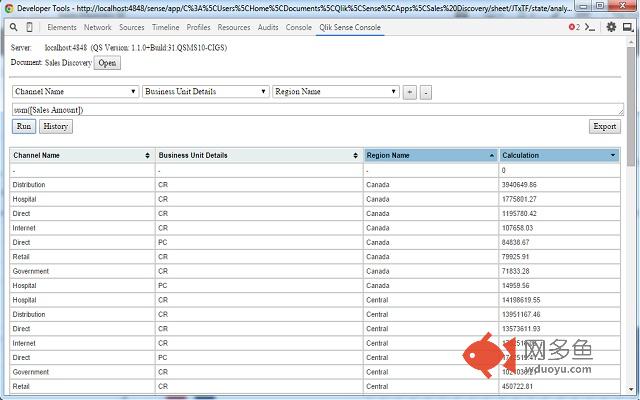
插件概述
Run calculations agains Qlik Sense (desktop and server) from Chrome Dev Tools插件详情
Access Qlik Sense (desktop or server) from Chrome Dev Tools and run dimension/expression calculations while developing or to debug ready apps.FOR QS SERVER ACCESS: Add "ljeoadpijoacanhinddngndcalkggkmf" to "Websocket origin white list" (QMC -> Virtual Proxies -> Default -> check Advanced --> Add new value --> paste --> Apply)
How to work:
- open QS app (for desktop users http://localhost:4848) in Chome
- Press F12 or Ctrl+Shift+i to activate Chrome Dev Tools
- Navigate to "Qlik Sense Console tab"
- wait for connection to be established
- press Open
- wait for the doc to be open and fields to be extracted
- enjoy :)
Hint: You can always detach the Chrome Dev Tools pressing the top right icon
Thanks to Alexander Karlsson (@mindspank) for qsocks library!
Repo: https://github.com/countnazgul/qlik-sense-chrome-devtools-extension
For issues and features please use the GitHub repo
Change log:
0.7.3 --> Initial version
0.9.1
* multiple dimensions
* history - track each calculation execution. option to reuse them
* result table design is changed
* result table is sortable (multiple column sort is possible holding the Shift key)
* option to export/download the result table
其他信息
官方唯一标识:ljeoadpi****************alkggkmf
官方最后更新日期:2015年7月7日
分类:开发者工具
大小:164KiB
版本:0.9.1
语言:English
提供方:sstoichev.eu
星级:4.7
插件下载
| 下载链接一 下载链接二 |
| Chrome插件离线安装教程 |
温馨提示
本站中的部份内容来源网络和网友发布,纯属个人收集并供大家交流学习参考之用,版权归版权原作者所有。
如果您发现网站上有侵犯您的知识产权的作品,请与我们取得联系,我们会及时修改或删除。
如果您觉得网多鱼对您有帮助,欢迎收藏我们 Ctrl+D。