PixelTool
插件截图
插件概述
Allows you to overlay a design to improve the precision of frontend development插件详情
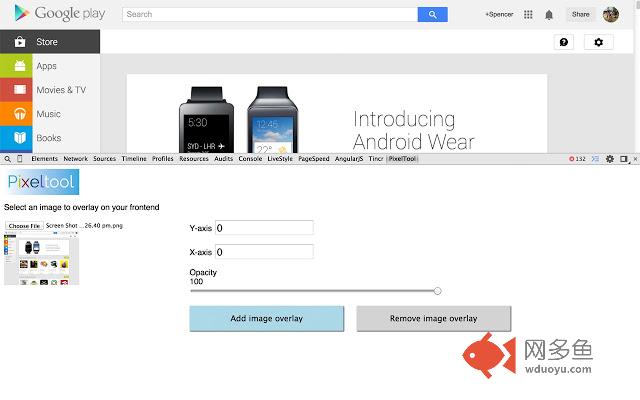
Overlay a design on a webpage for easily following a wireframe or design when developing.This extension comes with an easy to use UI thats sits out of the way as a dev-tools panel. It allows a developer or designer to add a transparent image over real HTML in order to assisting in writing html structure and css that is close to designs or wireframes.
Features
- Adjustable opacity.
- Sits out of the way in Dev-tools panel
- Easy to use UI
- Real time opacity and positioning for images
Usage
- Open Dev-tools, a new panel called PixelTool will be created, select this.
- Upload the image you wish to overlay.
- Click Overlay image.
- Adjust the X and Y axis and the opacity in real time.
By Spencer Walden @ www.spencer-walden.com
其他信息
官方唯一标识:kpgeilok****************bfmpidjf
官方最后更新日期:2014年10月26日
分类:开发者工具
大小:22.71KiB
版本:1.1
语言:English
提供方:none
星级:2.5
插件下载
| 下载链接一 下载链接二 |
| Chrome插件离线安装教程 |
温馨提示
本站中的部份内容来源网络和网友发布,纯属个人收集并供大家交流学习参考之用,版权归版权原作者所有。
如果您发现网站上有侵犯您的知识产权的作品,请与我们取得联系,我们会及时修改或删除。
如果您觉得网多鱼对您有帮助,欢迎收藏我们 Ctrl+D。