monospace
插件截图
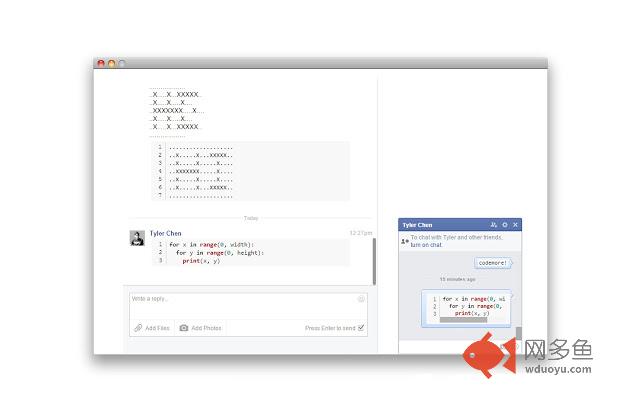
插件概述
Display monospaced and highlighted code blocks instantly in Chrome!插件详情
Monospace formats code sent through Facebook chat into monospaced, syntax-highlighted, line-numbered code blocks. Additionally monospace will highlight and add line numbers to files viewed in the chrome file viewer. Multiple highlighting themes are included and can be switched in the options menu.To use monospace simply send code through facebook wrapped with the delimiters set in the options page.
EXAMPLES:
- ```for x in range(0:10):
print(x)```
- you can also have ```inline code```
Notes:
This is still very much a work in progress. I'm currently looking for bugs and unintended behavior. I'll remove all the console logs once I'm satisfied with its stability.
The UI is still pretty clunky since I haven't spent much time working on that. I'll revamp the options page and the chrome webstore page soon.
By default monospace uses three backticks (like markdown). Monospace will also reverse the start delimiter and use that as the end delimiters unless a custom end delimiter is specified. Pages will need to be refreshed to use the new delimiters.
If there are more than one line breaks in a row, monospace will reduce them to a single line break. This is due to limitations with how Facebook displays messages.
Removing items from the whitelist will prevent monospace from acting on that item. Currently the functionality of the whitelist is very basic.
其他信息
官方唯一标识:bjeojhoa****************hhmmnafg
官方最后更新日期:2015年2月13日
分类:开发者工具
大小:91.58KiB
版本:0.1.0
语言:English (United States)
提供方:none
星级:4.8
插件下载
| 下载链接一 下载链接二 |
| Chrome插件离线安装教程 |
温馨提示
本站中的部份内容来源网络和网友发布,纯属个人收集并供大家交流学习参考之用,版权归版权原作者所有。
如果您发现网站上有侵犯您的知识产权的作品,请与我们取得联系,我们会及时修改或删除。
如果您觉得网多鱼对您有帮助,欢迎收藏我们 Ctrl+D。