Modify Content-Type
插件截图
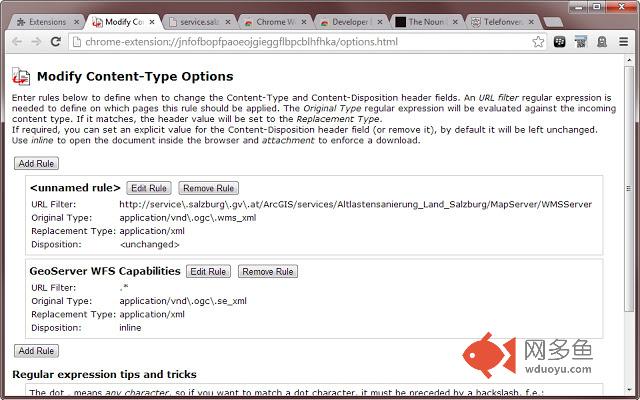
插件概述
Change the response content type to force documents to open in or outside the browser window or in a special view mode (PDF, XML...)插件详情
This extension is in beta state, please send feedback on your experiences and wishes!'Modify Content-Type' allows manipulation of the Content-Type and Content-Disposition HTTP header fields of incoming documents. This may be helpful if you like to force the browser to either show a document inside the browser window or to offer it as a download. It also can be used to override unknown mime types sent by misconfigured servers. Just replace them by f.e. 'application/pdf' or 'application/xml' and Chrome will know how to show the document.
Permissions:
- 'Access your data on all websites': required to get access to the http headers of requested documents.
Updates:
- 0.2
-- added support for multiple rules per URL
其他信息
官方唯一标识:jnfofbop****************cblhfhka
官方最后更新日期:2013年11月15日
分类:开发者工具
大小:41.58KiB
版本:0.2
语言:English (United States)
提供方:none
星级:4.4
插件下载
| 下载链接一 下载链接二 |
| Chrome插件离线安装教程 |
温馨提示
本站中的部份内容来源网络和网友发布,纯属个人收集并供大家交流学习参考之用,版权归版权原作者所有。
如果您发现网站上有侵犯您的知识产权的作品,请与我们取得联系,我们会及时修改或删除。
如果您觉得网多鱼对您有帮助,欢迎收藏我们 Ctrl+D。