Live HTTP Headers
插件截图
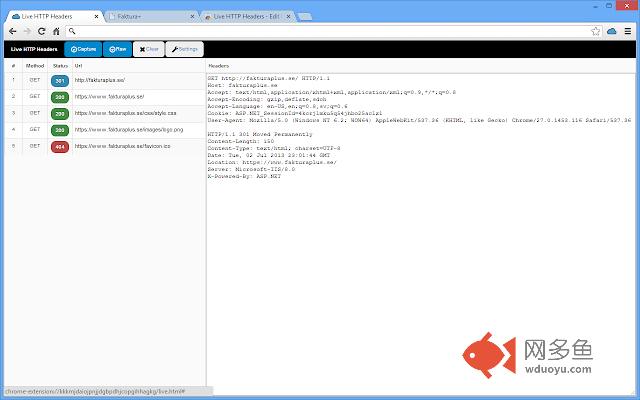
插件概述
Monitor all HTTP/HTTPs traffic from your browser.插件详情
Live HTTP Headers logs all HTTP traffic between your Chrome browser and the Internet.This extension can be helpful if you want to:
* Debug web application
* Follow redirect path
* See cookies sent by remote site
* See which web server the remote site is using
* See the headers sent to the server
* See which headers the server returns
* See the HTTP verbs used.
* See Response Codes
You can from the settings dialog choose what type of resource you want to capture.
This extension shows you all the headers as they were sent to the server and also the response back. It is not making a second request as some other extensions. All HTTP traffic i captured live.
Developers often want to sniff the REST headers and find that the header information is often more important than the body.
The HTTP headers gives you a lot of information that helps you to determine technology used(Ruby on Rails, ASP.NET, PHP, JBoss, etc.), if the page is cached, encoding and much more.
You can for example get information about Server, Content-Encoding, Content-Type, Content-Length, Expires, Cache-control, X-Powered-By, X-Version, X-Cache, X-AspNet-Version, X-XSS-Protection, X-Content-Security-Policy and many others.
Also see the verbs like GET, POST, HEAD, DELETE, PUT etc.
Hope you find this extension useful.
其他信息
官方唯一标识:eaiimeeg****************ejddlcpa
官方最后更新日期:2017年11月29日
分类:开发者工具
大小:89.11KiB
版本:1.0.6
语言:English
提供方:https://www.esolutions.se
星级:4.7
插件下载
| 下载链接一 下载链接二 |
| Chrome插件离线安装教程 |
温馨提示
本站中的部份内容来源网络和网友发布,纯属个人收集并供大家交流学习参考之用,版权归版权原作者所有。
如果您发现网站上有侵犯您的知识产权的作品,请与我们取得联系,我们会及时修改或删除。
如果您觉得网多鱼对您有帮助,欢迎收藏我们 Ctrl+D。