JavaScript Tricks
插件截图
插件概述
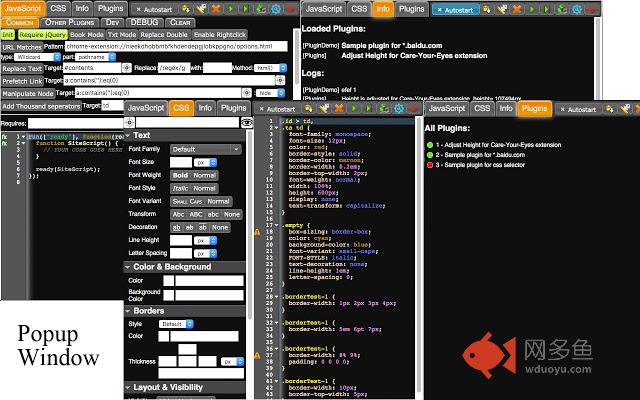
Add your own JavaScript (powered by JQuery) and/or CSS to any page to trick it!插件详情
JavaScript Tricks is a user script manager with dependency support, which means your can include other java scripts into your script. Besides site-scripts which are injected into web page when URL matches, JavaScript Tricks also maintains a content-script library, which can serves as import lib of site-scripts. Moreover, the content-scripts can directly invoked by clicking on context menus.This extension is based on JScript tricks developed by szamil. Many thanks to szamil and his/her great effort on JScript tricks is really appreciated!!!
It is developed because there is no more update provided by szamil and some features are needed badly.
Additional major features are provided:
1. Configuration backup and restore. Backups can be local or in cloud.
2. Scripts are classified into two categories: site-specific scripts and dynamic content scripts. A site-specific script is loaded automatically when corresponding website is opened in a tab. A dynamic content script can be loaded in two ways: 1) required by a site-specific script; 2) right-click on corresponding context menu.
3. Site-specific scripts can be generated with GUI according to meta-data.
This extension is still in develop and hence bugs may exist.
Release Notes:
v2.1.4
Bugfix:
Fix a bug that popup window does not display when clicking the extension icon.
Fix a bug that only one plugin toggling taking effect when toggling multiple plugins in plugin tab within popup window.
Change:
Change multiple plugin default enalbing status.
v2.1.2
Feature added:
Auto-backup scripts in cloud storage when saving scripts in options page.
Auto-backup scripts in cloud storage when changing scripts in popup window.
v2.1
Feature added:
Add jshint options for max error count
Auto-backup scripts in cloud storage when saving scripts in popup window
Auto-check new backups in cloud storage
Change:
Bugfix:
Fix context menu scripts not responding bug in recent versions of Chrome.
v2.0
Feature added:
Theme support. A dark theme as well as an extra light theme are provided.
Script editor is more powerful now which supports syntax autocomplete by pressing Ctrl+Space, and syntax checking when editing.
Minor UI improvements.
Change:
The background page will be closed when idle to reduce memory usage.
Migrate script storage from LocalStorage to IndexedDB to bypass 5MB storage size limitation of LocalStorage.
v1.1.1:
Fix some display issues on Windows version of Chrome.
v1.1.0:
Feature added:
Enable/Disable extension in popup window.
Batch find and replace for site-specific scripts in option page.
Popup editing window can be pinned as a dialog in web page.
select node.
Support injecting code into original context other than separated extension context.
Change:
Sea.js is incorporated to serve as a module manager. The include filed of scripts is not necessary any more.
Besides the script name, the script menu in dynamic content scripts tab shows group of script now.
The generated UI region create by meta data can be set with a max-height css attribute.
Bugfix:
Some buttons setting editor font size do not respond.
jQuery UI css image problems.
v1.0.1:
Content scripts can include other scripts by designating "include" values.
v0.9.86:
Site-Content Scripts can be filtered by their contents.
其他信息
官方唯一标识:dpkgacdh****************gnjibodb
官方最后更新日期:2019年3月8日
分类:开发者工具
大小:1.34MiB
版本:2.1.4
语言:English
提供方:none
星级:3.8
插件下载
| 下载链接一 下载链接二 |
| Chrome插件离线安装教程 |
温馨提示
本站中的部份内容来源网络和网友发布,纯属个人收集并供大家交流学习参考之用,版权归版权原作者所有。
如果您发现网站上有侵犯您的知识产权的作品,请与我们取得联系,我们会及时修改或删除。
如果您觉得网多鱼对您有帮助,欢迎收藏我们 Ctrl+D。