HTTP Headers
插件截图
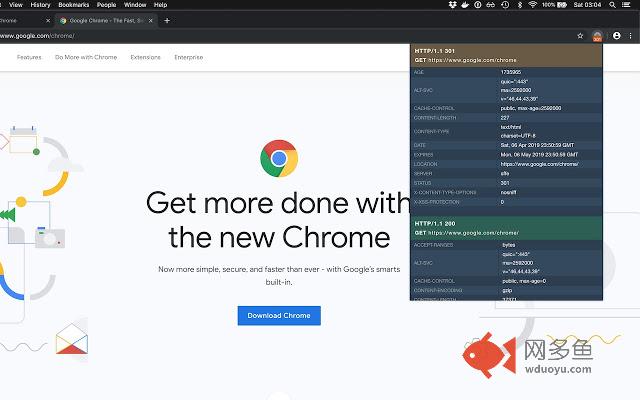
插件概述
View and inspect HTTP headers for the current webpage request, including redirections and status codes.插件详情
Quickly view and inspect all the HTTP response headers and status code of the current page.Uses chrome's webRequest to access the headers of the original request, no additional requests are made.
Minimal & lightweight extension, a crucial for anyone developing for the web.
Features:
★ See the status code instantly displayed on a badge
★ Detect and follow redirect paths, displaying all the headers for each one
★ Inspect cookies set by remote site
★ Access info about the machine serving the content
★ Check HTTP verbs and response codes
★ Quickly check if you are seeing cached content
Please don't forget to rate this extension, and submit feature requests that you think will help you and others!
Release notes for v1.1.1:
— Dark mode friendly icon ?
— Popup is now smoother than butter, and 100ms faster too
— Different color for redirect and error status codes
— Localization! Support for english, spanish, portuguese and french
— Legibility tweaks
— Proper build pipeline, so I can roll out frequent updates & new features ?
Hidden:
— Analytics
OLD:
v1.0.5
— Minor CSS tweaks, and char replacements
v1.0.4
— Minor bugfix
v1.0.3
— Major refactor in the code, now runs extremely fast and has new features
— Displays all redirects and their status codes
— Badge with the status code if different than a 200 OK
其他信息
官方唯一标识:fhfgeglo****************lbclfebg
官方最后更新日期:2019年7月9日
分类:开发者工具
大小:21.34KiB
版本:1.1.1
语言:支持5种语言
提供方:none
星级:4.6
插件下载
| 下载链接一 下载链接二 |
| Chrome插件离线安装教程 |
温馨提示
本站中的部份内容来源网络和网友发布,纯属个人收集并供大家交流学习参考之用,版权归版权原作者所有。
如果您发现网站上有侵犯您的知识产权的作品,请与我们取得联系,我们会及时修改或删除。
如果您觉得网多鱼对您有帮助,欢迎收藏我们 Ctrl+D。