GWT Super Dev Button
插件截图
插件概述
Extension for GWT super dev mode developers插件详情
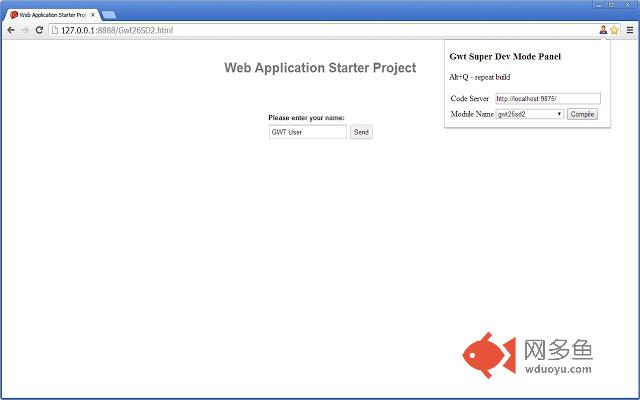
Extension for GWT developers who uses Super Dev Mode. It is a small "page action" button which allows to view all modules on specified codeserver and compile them without the need to add bookmarklets each time for each module.-'Module' dropdown displays all available modules on the specified code server
-On pressing the 'Compile' button the 'code server url' will be remembered
-On changing the 'code server' url modules will be reloaded
PLEASE NOTE:You may need to re-install the extension, in order to make Hot-Key work
$IF YOU FIND A BUG PLEASE DON'T HESITATE TO SUBMIT BUG REPORT$
Updates:
v.1.2.1 - Fixed problem with multi module projects
v.1.2.0 - Fixed layout issue (after Chrome changes), fixed disabling compile button
v.1.1.0 - Use Alt+Q to recompile (with last selected url and module name)
v.1.0.6 - More compact popup dialog
v.1.0.4 - Fixed problem with multi module projects
v.1.0.3 - Fixed annoying err message in a console
其他信息
官方唯一标识:piekceem****************cikpmleh
官方最后更新日期:2015年4月9日
分类:开发者工具
大小:120KiB
版本:1.2.1
语言:English
提供方:none
星级:3.7
插件下载
| 下载链接一 下载链接二 |
| Chrome插件离线安装教程 |
温馨提示
本站中的部份内容来源网络和网友发布,纯属个人收集并供大家交流学习参考之用,版权归版权原作者所有。
如果您发现网站上有侵犯您的知识产权的作品,请与我们取得联系,我们会及时修改或删除。
如果您觉得网多鱼对您有帮助,欢迎收藏我们 Ctrl+D。