Git-Splainin
插件截图
插件概述
You've got some git-splainin' to do插件详情
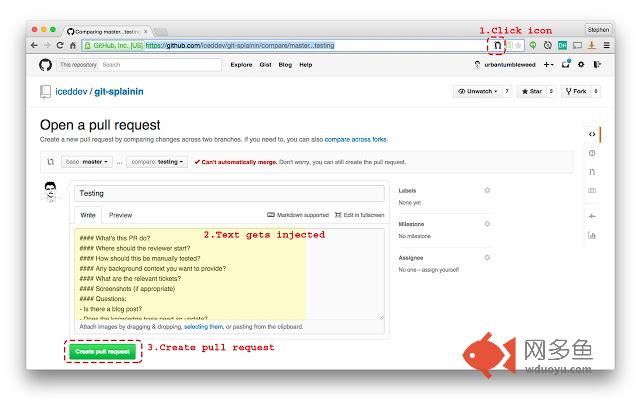
This plugin allows you to easily insert a template into the page when you open a new Pull Request on GitHub, either automatically or by clicking the Pull Request icon that appears in the URL bar. Clicking the icon again will remove an unedited version of the template. The plugin uses a simple pre-defined template, but the options page allows users to set their own template by supplying a URL, editing the template manually, or a combination of the two. When setting a new template, all open Pull Requests using an unedited version of the template will be updated with the new version upon save. Users can also opt to have their new Pull Requests filled with the template automatically. With this option, the plugin will detect when users are opening a new Pull Request and automatically populate the Pull Request body field. Upon setting this option, all empty Pull Requests in open tabs will be populated with the template. Git ready to ‘splain yourself.More information on Pull Request templates: https://quickleft.com/blog/pull-request-templates-make-code-review-easier/
Source code available at: https://github.com/iceddev/git-splainin
其他信息
官方唯一标识:adbhpaol****************fkdneeea
官方最后更新日期:2015年6月9日
分类:开发者工具
大小:380KiB
版本:1.0.0
语言:English (United States)
提供方:https://iceddev.com
星级:5
插件下载
| 下载链接一 下载链接二 |
| Chrome插件离线安装教程 |
温馨提示
本站中的部份内容来源网络和网友发布,纯属个人收集并供大家交流学习参考之用,版权归版权原作者所有。
如果您发现网站上有侵犯您的知识产权的作品,请与我们取得联系,我们会及时修改或删除。
如果您觉得网多鱼对您有帮助,欢迎收藏我们 Ctrl+D。