Chrome Event Logger
插件截图
插件概述
Log all chrome.* API events.插件详情
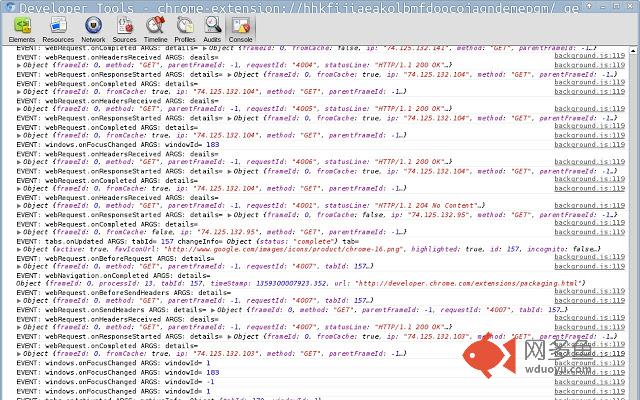
CEL, the Chrome Event Logger, logs all Chrome browser API events to the console of its background page. It is intended to help developers see the names of events Chrome is triggering, when they occur, and with what arguments. Typical use cases are:1. You wonder if there is a Chrome API event that's triggered for some action you take in the browser. Rather than guessing what the event might be and trying to find it in the API docs, you can enable CEL, perform the action in Chrome, and see what CEL logs.
2. You're writing an extension and are unsure about whether an event is being triggered or with what arguments. Instead of adding an event listener in your own code and reloading your extension, you can just look in the CEL log.
## Viewing the logging
Once installed, you can examine the CEL logging by visiting chrome://extensions, clicking to enable Developer mode, and then clicking the link next to the CEL icon where it says Inspect views: _generated_background_page.html
## Manually adjusting logging
In the JS console for the extension's background page, there are several commands you can run to adjust what is logged:
// Return a list of the chrome.* API events being logged.
CEL.enabled()
// Return a list of the chrome.* API events being ignored.
CEL.disabled()
// Enable logging of some calls (see below).
CEL.enable(name1, name2, ...)
// Disable logging of some calls (see below).
CEL.disable(name1, name2, ...)
The names you pass to CEL.enable and CEL.disable can be individual API calls (without the leading "chrome."), or can be higher-level categories. Here are some examples:
// Enable chrome.tabs.onCreated and all chrome.webRequest.* events:
CEL.enable('tabs.onCreated', 'webRequest')
// Disable all chrome.tabs.* events and chrome.webNavigation.onCommitted
CEL.disable('tabs', 'webNavigation.onCommitted')
Note that CEL.enable will enable all necessary higher level logging. So, for example, if you call CEL.enable('omnibox.onInputEntered') all chrome.omnibox.* events (that have not been explicitly disabled) will be logged. If you don't want to enable and disable groups of calls in this way, always pass explicit API calls.
CEL.disabled will show you the names of individual calls that are disabled, as well as any disabled higher levels.
## Global enable / disable
The extension provides a context menu item that lets you globally enable or disable logging.
其他信息
官方唯一标识:hhkfijia****************ndemepgm
官方最后更新日期:2013年1月27日
分类:开发者工具
大小:11.28KiB
版本:0.0.77
语言:English (United States)
提供方:none
星级:2
插件下载
| 下载链接一 下载链接二 |
| Chrome插件离线安装教程 |
温馨提示
本站中的部份内容来源网络和网友发布,纯属个人收集并供大家交流学习参考之用,版权归版权原作者所有。
如果您发现网站上有侵犯您的知识产权的作品,请与我们取得联系,我们会及时修改或删除。
如果您觉得网多鱼对您有帮助,欢迎收藏我们 Ctrl+D。