Chrome AEM Plugin
插件截图
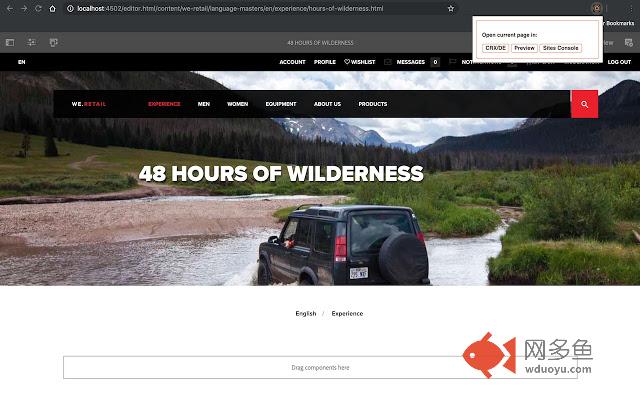
插件概述
Plugin to save time debugging as an AEM developer.插件详情
While developing an AEM application, it can be frustrating to have to switch between CRX/DE, the sites console (Touch UI) and a preview of the page. This extension provides a handy way of switching to one of these views, without having to meddle with the URL yourself.Set-up:
- In the extension options, you can add a mapping for a domain to its IP. This could be necessary, because access to CRX/DE may be blocked on dispatcher level.
- You can add as many mappings as you want.
- The mappings are ONLY stored locally, and are not saved/gathered by the extension in any way.
What's new in version 1.2.1?
- Fixed a bug where the labels for customising the shortcuts were all the same, which can be confusing :)
- You can customise the shortcuts by going to chrome://extensions and then selecting "Keyboard Shortcuts" from the hamburger menu on the left.
___________________________
What's new in version 1.2.0?
- A new look! Because who doesn't like a makeover?
- Shortcuts! Use the following shortcuts so you don't even have to open the extension:
* Alt+Shift+C: Open in CRX
* Alt+Shift+P: Open in Preview
* Alt+Shift+S: Open in Sites
- Feedback or suggestions? Just drop an e-mail to koen.van.eeghem@gmail.com!
- Like the plugin? Be sure to leave a review ;)
This extension is NOT affiliated with, funded, or in any way associated with Adobe®️ or Adobe Experience Manager®️.
其他信息
官方唯一标识:kodhebfi****************ggdgkddd
官方最后更新日期:2019年4月1日
分类:开发者工具
大小:57.37KiB
版本:1.2.1
语言:English
提供方:none
星级:5
插件下载
| 下载链接一 下载链接二 |
| Chrome插件离线安装教程 |
温馨提示
本站中的部份内容来源网络和网友发布,纯属个人收集并供大家交流学习参考之用,版权归版权原作者所有。
如果您发现网站上有侵犯您的知识产权的作品,请与我们取得联系,我们会及时修改或删除。
如果您觉得网多鱼对您有帮助,欢迎收藏我们 Ctrl+D。