Automatic Actions Management
插件截图
插件概述
This extension will able to run predefined user events.插件详情
Automatic Actions ManagementThis chrome extension will able to run predefined user events.
Version
----
1.0.2
Example usage
----
Cookie accepter:
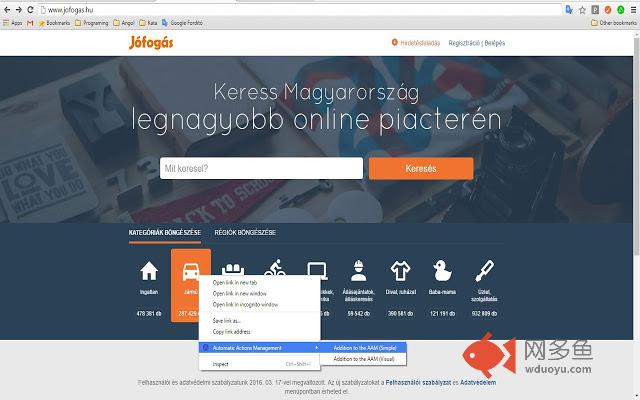
- Open the website where you wish to use AAM
- Click right mouse button on the acceptor of the cookies.
- Select 'Addition to the AAM (Simple)' item from context menu list.
- The extension has created the 'Action' in the background with default settings.
- if you want to view or to modify the settings, click on AAM icon on top right corner of the browser.
- When popup window opens, click AAM setting button.
- Settings tab opens.
Settings tab table columns:
- Target URL: it is a target website url where you want to activate AAM
- Selector Or Script: selected item full DOM path Or script Filename*
- Document state: That status of the document, when you want to launch AAM (Dom content loaded or window loaded)
- Event type: click, remove or script (inject)
- Repeat: repeat count
- Timeout (ms): repeat timeouts
- On-Off: enable, disable
- Remove: delete row
*created automatically if selected event is injected and clicked into 'Selector Or Script' named cell.
- Script inject mode
Special Visual selection:
- Open the website where you wish to use AAM
- Click right mouse button on the acceptor of the cookies.
- Select 'Addition to the AAM (Visual)' item from context menu list.
Hold right ALT Key and press:
- w: select parent
- s: select first children
- d: select next sibling
- a: select prev sibling
- e: add to AAM
- q: quit
Author: Tóth András
---
http://atandrastoth.co.uk/
2016-03-16
其他信息
官方唯一标识:ecadnaka****************koopdoag
官方最后更新日期:2016年3月24日
分类:开发者工具
大小:1.93MiB
版本:1.2
语言:English
提供方:www.atandrastoth.co.uk
星级:5
插件下载
| 下载链接一 下载链接二 |
| Chrome插件离线安装教程 |
温馨提示
本站中的部份内容来源网络和网友发布,纯属个人收集并供大家交流学习参考之用,版权归版权原作者所有。
如果您发现网站上有侵犯您的知识产权的作品,请与我们取得联系,我们会及时修改或删除。
如果您觉得网多鱼对您有帮助,欢迎收藏我们 Ctrl+D。