Textverter - for Russian/English keyboard
插件截图
插件概述
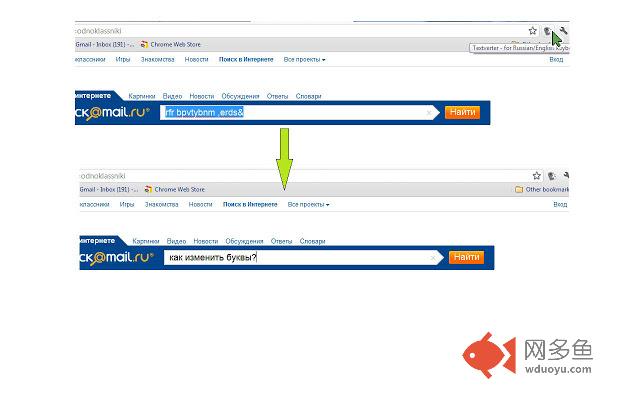
Textverter - fixes text that was typed in a wrong language, by converting english letters to russian letters, and vice versa插件详情
Textverter for Russian/English keyboard is a very useful extension for situations when we type something in one language and only after we did some typing, we notice that we were typing in the wrong language.For example, if we wanted to type "Hello world", but our keyboard was set to Russian, we'll get "Руддщ Цщкдв".
Or if we wanted to type the Russian word "Здравствуйте", but our keyboard was set to english, then we'll get "Plhfdcndeqnt".
Textverter will convert the wrong text to the text that we meant to type.
Textverter can be used in 3 ways:
1. Just select the wrong text, click on the Textverter icon and the selected text will be fixed. (If the text was selected in a field that is not editable, the fixed text will appear in a pop-up)
Or
2. select the wrong text, press shift+alt+r on the keyboard, and the selected text will be fixed (only if the text was selected in an editable field)
Or
3. Click on the Textverter icon, copy the wrong text to the pop-up window, click "fix", and you'll have the correct text!
Use the "copy" button to copy the fixed text to clipboard, and paste it in the desired location.
note #1: in some places there is a problem retrieving the selected text, in these cases the 1st and the 2nd options will not work, but only the 3rd option will be available (copying the text into the pop-up window)
note #2: The use of extensions on the Google app site or on the extensionSettings page is disabled. In order to use the extension, you must navigate to a different page.
其他信息
官方唯一标识:cknpkphh****************fbmfaapb
官方最后更新日期:2012年7月27日
分类:社交与通讯
大小:125KiB
版本:1.310
语言:支持2种语言
提供方:none
星级:3.5
插件下载
| 下载链接一 下载链接二 |
| Chrome插件离线安装教程 |
温馨提示
本站中的部份内容来源网络和网友发布,纯属个人收集并供大家交流学习参考之用,版权归版权原作者所有。
如果您发现网站上有侵犯您的知识产权的作品,请与我们取得联系,我们会及时修改或删除。
如果您觉得网多鱼对您有帮助,欢迎收藏我们 Ctrl+D。