SAM
插件截图
插件概述
Official SAM Chrome Extension - Curate & Tag content directly from social networks.插件详情
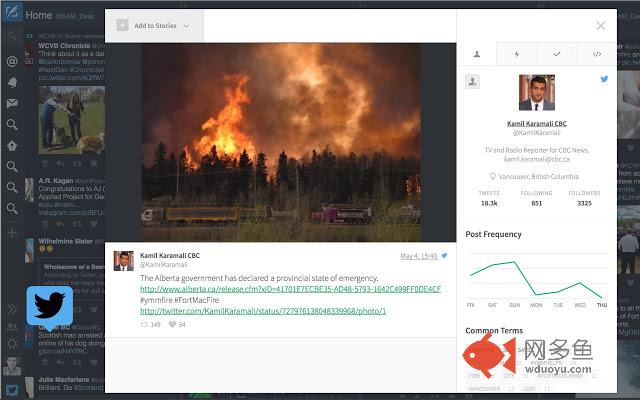
The SAM Chrome Extension enables you to curate and tag social media content directly from Tweetdeck and Facebook Signal as well as social networks like Twitter, Instagram, and YouTube. Plus, you can see your SAM notifications in real time with Chrome Notifications and our pop-over stream.After the extension is installed, the SAM icon will appear in the upper right corner of the screen. Clicking this at any time will open a popup showing your recent notifications. When the extension detects a social asset being displayed, the icon will change from a light grey outline to a solid icon indicating that it can be imported. An import button will now be present in the popup to import the current social asset.
On compatible social networks, a SAM icon will also appear inline on social assets that can be imported. To import the asset, just click on the inline icon to open the asset modal. Either method will open the asset modal on the current page. Here, you can add the asset to one or more of your stories using the ‘Manage Stories’ dropdown in the top left corner of the asset modal. You can also edit tags, leave notes and annotations, add a caption, and even request permission on Twitter, Instagram, and YouTube assets.
* NOTE: You need a SAM account to use this extension. If you don't have a SAM account, please visit www.samdesk.io *
This extension supports:
- Tweetdeck.com
- Signal (Facebook)
- YouTube
- Instagram (public posts)
- Facebook (public posts)
- VKontakte
- Vimeo
- Google+
- Flickr
Other networks coming soon!
其他信息
官方唯一标识:ohbloeck****************chacjaib
官方最后更新日期:2019年5月15日
分类:社交与通讯
大小:325KiB
版本:3.4.17
语言:English
提供方:samdesk.io
星级:4.6
插件下载
| 下载链接一 下载链接二 |
| Chrome插件离线安装教程 |
温馨提示
本站中的部份内容来源网络和网友发布,纯属个人收集并供大家交流学习参考之用,版权归版权原作者所有。
如果您发现网站上有侵犯您的知识产权的作品,请与我们取得联系,我们会及时修改或删除。
如果您觉得网多鱼对您有帮助,欢迎收藏我们 Ctrl+D。