PocketMonitor
插件截图
插件概述
Because one size does not fit all.PocketMonitor creates a new video at the top with scaleable video size to maximize the amount…
插件详情
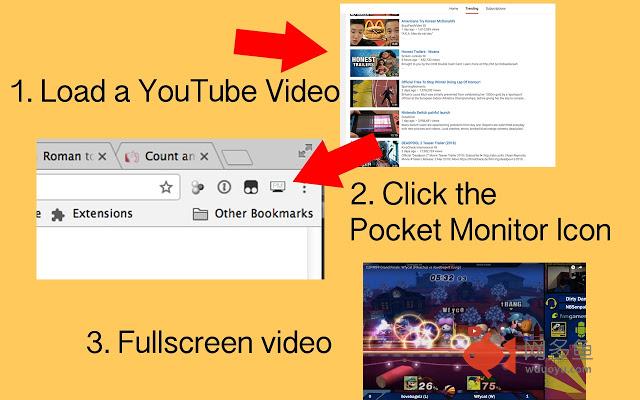
Because one size does not fit all.PocketMonitor creates a new video at the top with scaleable video size to maximize the amount of viewing space. in a new tab, the video is opened that is scalable to the browser size.
Steps:
1. Go to YouTube video page
2. Click the PocketMonitor Icon
3. Full Screen video!
Youtube currently has theater mode alongside full-screen video sizes, but other than that, there is no size for in-between. In many cases people use full-screen alongside multiple monitors, but in some cases if you don't have another monitor, you would need to suffice to one of these three sizes.
I made PocketMonitor because I wanted to have a quick or working way for Youtube videos to be resized based on the web browser size.
其他信息
官方唯一标识:okcaoddg****************jchkjing
官方最后更新日期:2017年3月7日
分类:辅助工具
大小:1.08MiB
版本:1.3
语言:English
提供方:none
星级:5
插件下载
| 下载链接一 下载链接二 |
| Chrome插件离线安装教程 |
温馨提示
本站中的部份内容来源网络和网友发布,纯属个人收集并供大家交流学习参考之用,版权归版权原作者所有。
如果您发现网站上有侵犯您的知识产权的作品,请与我们取得联系,我们会及时修改或删除。
如果您觉得网多鱼对您有帮助,欢迎收藏我们 Ctrl+D。