Googley Styles for Rizzoma
插件截图
插件概述
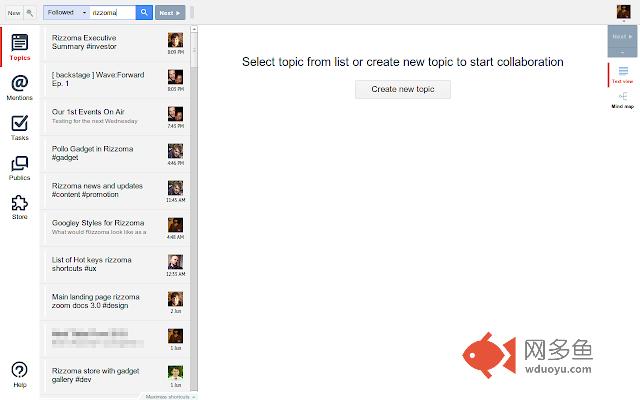
Change the Rizzoma interface to look like Gmail and other Google apps (a.k.a. Kennedy design).插件详情
What would Rizzoma look like as a Google app? Download this Chrome extension to find out. This extension changes the entire Rizzoma interface to look more like Google apps, such as Gmail. The result is a bit cleaner and more familiar.This extension is compatible with Rizzoma Rearranger, but may conflict with Rizzoma Redecorator.
Read more at https://rizzoma.com/topic/336006483495185c3e2de4c9c05aaea4
Changelog:
1.7
• Added [/] keyboard shortcut to focus the search box
1.6
• Adds support for waves opened from Google Drive (rizzoma.com/drive/...)
1.5
• Fixes new wave/wizard split button
• Fixes “Pro” labels on left side tabs
• Fixes Chrome adding outlines to buttons
• Fixes the Googley toolbar styles that disappeared
• Styles unstyled text fields including...
- the subject text box in the new wave wizard
- the embedding code box
• Styles the new topic button in the new wave wizard
- I elected to change it to red from its default green to match create/compose buttons in most Google apps.
• Improves styling for green unread buttons
• Removes script for enabling Rizzoma UI version 1 now that separate view and edit modes are enabled by default
1.4
• Fixes toolbars covering blips in Rizzoma build 10660
• Temporarily disables compact density blip styles
• Makes most button icons darken on hover (as they do in Google apps)
• Removes text shadow on buttons
• Desaturates the gear icon on the wave toolbar
• Desaturates inactive icons in left side and text/mind map tabs
• Makes active tab icons red
• Moves the “Write a reply...” box down to where the new blip will appear if the box is clicked
1.3
• Styles Followed/Unfollowed/All menu in search box (based on Google Drive filters' styling)
1.2
• Styles search boxes and search buttons
• Styles search status message
• Fixes positioning of the green unread indicators
• Styles the active states of green “Next unread” buttons
• Styles the top-right profile picture, drop-down arrow, and e-mail menu
• Improves padding in and spacing around blips
• Fixes rounded corners around root threads
• Fixes root-level floating toolbars moving outside the wave panel
• Fixes border radius on buttons
• Left-aligns the avatar in the “Write a reply...” box
• Enables Rizzoma “Next” UI (separate view and edit modes) upon installation
- This is because the extension is not designed for and causes problems in the default interface.
- You will need to refresh Rizzoma to see this change.
1.1
• Changes thread styles to resemble Google Now/Google+ cards
• Styles the reader/commenter/editor menus (where not styled in v0.9.1)
• Fixes items in the root blip's gear menu being styled like normal toolbar buttons instead of menu items
• Fixes the blue background at the bottom of the root thread
1.0
• Adds styles for the wave panel
• Adds styles for the Store
• Fixes search header sometimes not being styled
0.9.1
• Fixes the role (viewer/commenter/editor) chooser styling
0.9
• Initial release, which covers pretty much everything outside of the wave panel.
其他信息
官方唯一标识:kmfhjofh****************dpcpoedm
官方最后更新日期:2019年5月10日
分类:辅助工具
大小:16.94KiB
版本:1.7.1
语言:English
提供方:none
星级:none
插件下载
| 下载链接一 下载链接二 |
| Chrome插件离线安装教程 |
温馨提示
本站中的部份内容来源网络和网友发布,纯属个人收集并供大家交流学习参考之用,版权归版权原作者所有。
如果您发现网站上有侵犯您的知识产权的作品,请与我们取得联系,我们会及时修改或删除。
如果您觉得网多鱼对您有帮助,欢迎收藏我们 Ctrl+D。