Bulk URL Opener
插件截图
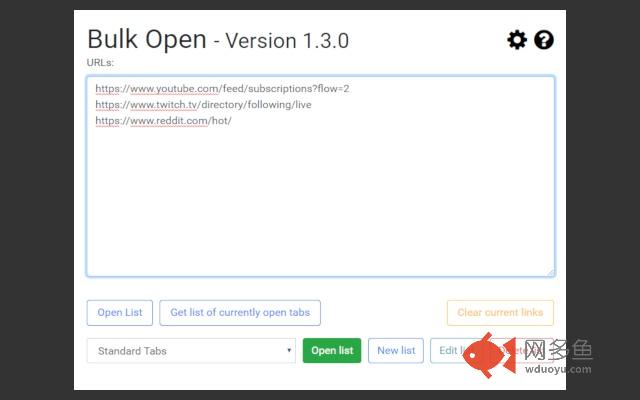
插件概述
A Google Chrome Extension that provides the user with lots of features to handle lists of urls.插件详情
A simple and easy to use extension which allows the user to open a list of URL's in one click. Or alternatively you can create and store lists of links that you use and then load them from the drop down menu in the extension to open large amounts of links quickly and easily.Key Features:-
-Allows a user to open a list of links quickly and easily
-Ability to save, load and edit lists of links to provide an easier way to store and use a large amount of links
-Tab Creation Delay: A user requested feature that allows the user to set a specified delay (in seconds) between each tab being created when a large number of links are opened
-Custom themes: Change the look of the extension by using a different theme
PERMISSIONS REQUIRED:-
"Read your browsing history":
This permission allows the extension to create tabs for you. It also allows the extension to get the URL's from currently open tabs when the 'Get list of currently open tabs' button is clicked
"Storage":
This permission allows the extension to store the lists you have created in your browsers local storage.
Changelog:-
1.3.3:
- Fixed bug which would stop the user from creating more than 10 lists. Causing the list with the id 10 to be overwritten with a new list.
1.3.2:
- Small code optimization for loading popup load times
- Improved shadow for modals
1.3.1:
- Fixed bug where checkboxes would be missing on the settings page if the user had not saved settings previously
- Fluent design bootstrap is now provided with the extension package rather than being loaded over cdn
1.3.0:
- Added a simple night mode
- Added setting that allows users to change their bootstrap theme. Currently only supports default bootstrap and fluent design bootstrap.
1.2.0:
- Added a setting to automatically open a list when it is selected from the extensions popup. (This setting can be overruled by holding the ctrl key before selecting a list from the dropdown) (User requested feature)
- Added a setting to change the default list that is loaded when the extension is launched (User requested feature)
- Added button on popup to open the extension in a popup window
- Link lists and settings are now stored using JSON this improves the stability of the extension as more settings are added. Old lists and settings should be automatically converted
- Performance improvements, removed duplicate jQuery selectors to improve performance
- Added a new re-designed icon
- The extension is now open source. You can view the repository at here. (https://github.com/EuanRiggans/BulkURLOpener)
- Updated bootstrap to v4.1.1
- Updated jquery to v3.1.1
1.1.4:
-Fixed an issue where many links on the help page would not work correctly
1.1.3:
-Fixed a bug where lists without a trailing new line would not open the last link in the list
-Help page now contains links to get support, report bugs or suggest new features
1.1.2:
-Fixed an issue where Vivaldi users would not be able to open more than 9 tabs in one go
1.1.1:
-Fixed tab naming issue when Tab Creation Delay is used
-Removed unnecessary font files to reduce extension size
1.1.0:
-New method of storing lists of URLs. Old lists will be converted automatically
-Added settings page
-Added help page
-Added changelog page
-Added 'Tab Creation Delay' functionality (User requested feature)
-Code optimizations
1.0.1:
-Small code optimization
1.0.0:
-Initial release
其他信息
官方唯一标识:kgnfciol****************cjmhenep
官方最后更新日期:2018年12月4日
分类:辅助工具
大小:205KiB
版本:1.3.3
语言:English (United States)
提供方:bulkurlopener.com
星级:4.8
插件下载
| 下载链接一 下载链接二 |
| Chrome插件离线安装教程 |
温馨提示
本站中的部份内容来源网络和网友发布,纯属个人收集并供大家交流学习参考之用,版权归版权原作者所有。
如果您发现网站上有侵犯您的知识产权的作品,请与我们取得联系,我们会及时修改或删除。
如果您觉得网多鱼对您有帮助,欢迎收藏我们 Ctrl+D。