ASUS Download Master Chrome Extension
插件截图
插件概述
Simplifies adding torrent, ed2k, ftp files to ASUS Download Master queue插件详情
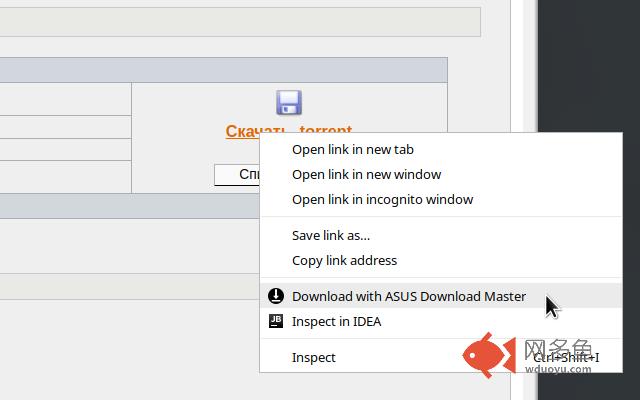
Adds context menu to every link which allows to quickly download file.- Download Master
Make sure you have an ASUS router with Download Master installed and running.
If Download Master not installed follow this tutorial: https://www.asus.com/support/FAQ/114001
- Options
Before you proceed you must specify several options by clicking on extension icon
Application URL - URL to Download Master application (usually its http://router.asus.com:8081)
Username - router admin username
Password - router admin password
Provided credentials won't be send anywere and will stored only on your current machine.
- Usage
Right-click on any link and select 'Download with ASUS Download Master'.
Torrent files are auto-detected so you don't need to worry about this.
You will see notification about success or error.
- Supported versions
Tested on RT-AC88U and Download Master ver. 3.1.0.104
- There is already 3 similar extensions
I know. They all not working now.
- Sources
https://github.com/acc15/asus-downloader-chrome
其他信息
官方唯一标识:fdbepfml****************dldhnhbo
官方最后更新日期:2019年2月17日
分类:辅助工具
大小:36.8KiB
版本:0.0.1
语言:English
提供方:none
星级:5
插件下载
| 下载链接一 下载链接二 |
| Chrome插件离线安装教程 |
温馨提示
本站中的部份内容来源网络和网友发布,纯属个人收集并供大家交流学习参考之用,版权归版权原作者所有。
如果您发现网站上有侵犯您的知识产权的作品,请与我们取得联系,我们会及时修改或删除。
如果您觉得网多鱼对您有帮助,欢迎收藏我们 Ctrl+D。