Search Site WE
插件截图
插件概述
Search within the current subdomain or within the entire domain.插件详情
CHANGESVersion 3.3
• Improvements to toolbar button and context menus.
Version 3.4
• Minor bug fixes.
OVERVIEW
Search Site WE provides facilities to search within the current subdomain or within the entire domain, using a selected search engine.
Search Site WE is an alternative simpler no-restart version of the well established Search Site add-on.
Search Site WE is implemented using the new WebExtensions API and is available for both Firefox and Chrome with identical functions and user interfaces.
OPTIONS PAGE
The Search Site WE Options page can be accessed as follows:
• Firefox - On the menu bar select Tools > Add-ons (or press Ctrl+Shift+A), select the Extensions tab, and then click on the Options button.
• Chrome - Right-click on the toolbar button, and then select Options.
TOOLBAR BUTTON
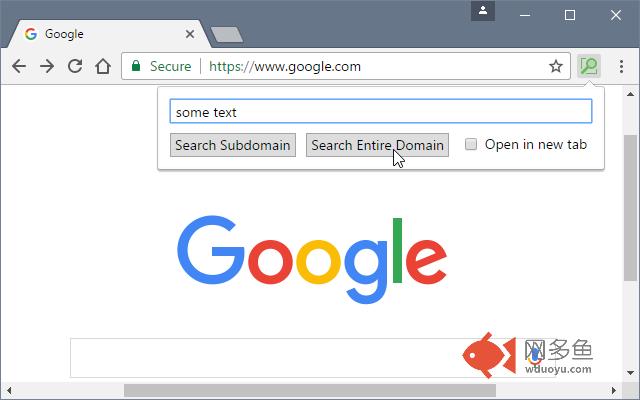
After installation of Search Site WE, there will be a new green 'magnifying-glass' button on the main toolbar.
If Search Site WE cannot be used with the current page, the toolbar button will be disabled (greyed-out).
To search within a site, first click on the toolbar button to show the popup panel, then type the search terms into the text box, and then click on the 'Search Subdomain' button or the 'Search Entire Domain' button (or press Enter to search within the default domain).
To open the search results in a new tab, tick the 'Open in new tab' checkbox.
If text in the page is selected before opening the popup panel, the text box will be filled with the selected text.
CONTEXT MENU ITEMS
To search within a site, first select some text within the web page, then right-click on the selected text and choose the 'Search Site WE' menu item, and then choose either the 'Search Subdomain' or the 'Search Entire Domain' sub-menu item.
There is an option to show/hide the Search Site WE submenu item on the context menu.
There is an option to only show the default domain on the context menu.
There is an option to enclose the selected text in quotes, so that it is searched as a single phrase.
There is an option to open the search results in a new tab.
KEYBOARD SHORTCUTS
To open the toolbar button popup panel, press Alt+K.
DEFAULT DOMAIN
There is an option to specify the 'Default Domain' as either the current 'Subdomain' or the 'Entire Domain'.
SEARCH ENGINES
There is an option to specify the 'Search Engine' that will be used for searches within sites. The search engine can be selected from 'Google', 'Bing', 'Yahoo', 'Ask' or 'DuckDuckGo'. The search engine can be either 'Global' or 'Local' (for a specific country). If a 'Local' search engine is selected, the 'Country Code' (e.g. 'de', 'es', 'it', 'fr', 'uk') must be specified.
There is an option to append additional search terms to the search URL, for example, &hl=fr to specify the language as French, or &pws=0 to de-personalize the search results.
SUPPORT
Please e-mail: dw-dev@gmx.com
LICENSE
Distributed under the GNU General Public License version 2.
See LICENCE.txt file and http://www.gnu.org/licenses/
其他信息
官方唯一标识:hjleocmf****************knmdkhkp
官方最后更新日期:2019年3月20日
分类:搜索工具
大小:61.15KiB
版本:3.4
语言:English (United States)
提供方:none
星级:4
插件下载
| 下载链接一 下载链接二 |
| Chrome插件离线安装教程 |
温馨提示
本站中的部份内容来源网络和网友发布,纯属个人收集并供大家交流学习参考之用,版权归版权原作者所有。
如果您发现网站上有侵犯您的知识产权的作品,请与我们取得联系,我们会及时修改或删除。
如果您觉得网多鱼对您有帮助,欢迎收藏我们 Ctrl+D。