Completed Listings on Ebay
插件截图
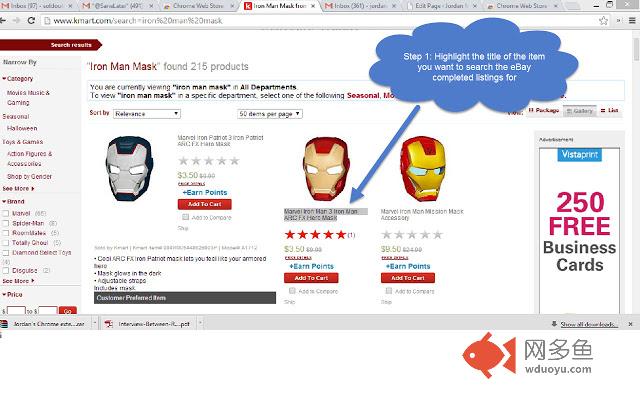
插件概述
'CLEER' is the '(C)ompleted (L)istings on (E)Bay (E)xtension for (R)esellers'.I developed it for anyone who wants to quickly…
插件详情
'CLEER' is the '(C)ompleted (L)istings on (E)Bay (E)xtension for (R)esellers'.I developed it for anyone who wants to quickly check the recent completed sales activity for a product they find anywhere online. It's a huge time saver, especially if you are 'buying low' to 'sell high' and thus need to make a purchase decision very quickly.
So people who may find this useful are:
a.) 'Online arbitrage' folks who like to buy an item from one online store so they can re-sell it on eBay, and thus they want to quickly check the completed sales data for that item.
b.) Amazon.com merchants who identify an item that DOESN'T exist in the Amazon.com catalog, but they want to get an idea of how well an item will sell before they invest in it. (In other words - checking the eBay completed listings for an item may be a good indicator of how well the item may perform on Amazon.com)
c.) People who get deal alerts from other sites (e.g. slickdeals.net) who would like to quickly check to see how well the item is selling on eBay, and for how much.
----------------------------
HOW TO USE CLEER
----------------------------
*After* you install the CLEER extension into your Chrome Browser:
1.) Browse or search for any product on any site (e.g., TheFind.com, Amazon.com, Kmart.com, Slickdeals.net, etc.). Or open up an email that you may have received that contains the title of an item (e.g., a slickdeals email alert).
2.) Highlight the title of the item (or any part of the title) using your mouse. To do this, simply left-click your mouse right before the first character in the product title, then, holding down your left mouse button, drag your mouse to the right until the title is highlighted.
3.) Un-press the left mouse button. Then press the mouse right button, and you'll see a drop-down menu appear. Select the 'Completed EBay Listings' menu item in the drop-down menu.
4.) A new tab will appear showing you the completed listings on eBay.
-----------------
ALTERNATE METHOD
----------------
1.) Follow Steps 1 to 2 above. THEN, after the text you want to search for highlighted by your mouse,
2.) Release the mouse button and go up to the right hand corner of your Chrome Browser, and click on the CLEER icon (it's a picture of my face). Click on it
3.) A small window will appear with the text of what you just highlighted in the search field. Edit the text if you wish, and then press 'Search on eBay'
4.) A new tab will appear showing you the completed listings on eBay.
-------------------------------------------------
Questions? Comments? Email me at: jordanmalik@gmail.com
Thank you!
**CLEER/this plugin is not associated nor affiliated with eBay Inc. in any way.
其他信息
官方唯一标识:fhlahfac****************cbpmkhpp
官方最后更新日期:2014年5月1日
分类:搜索工具
大小:59.57KiB
版本:1.0
语言:English
提供方:jordanmalik.com
星级:4.5
插件下载
| 下载链接一 下载链接二 |
| Chrome插件离线安装教程 |
温馨提示
本站中的部份内容来源网络和网友发布,纯属个人收集并供大家交流学习参考之用,版权归版权原作者所有。
如果您发现网站上有侵犯您的知识产权的作品,请与我们取得联系,我们会及时修改或删除。
如果您觉得网多鱼对您有帮助,欢迎收藏我们 Ctrl+D。