YouTube Audio Equalizer and Amplifier
插件截图
插件概述
Control audio equalization and volume level of YouTube and YouTube Music插件详情
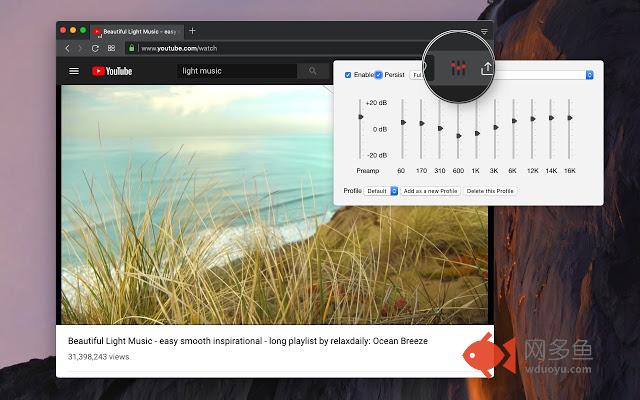
A tool for boosting or reducing (attenuating) the levels of different frequencies of YouTube and YouTube Music pages.The most basic type of equalization is the bass control on the old home audio equipment to control low frequencies and the treble control to adjust high frequencies. Since there are only two controls, the adjustment is for a fairly wide range of frequencies. In this extension, however, you can adjust a wide set of frequency ranges (60, 170, 310, 600, 1K, 3K, 6K, 12K, 14K, 16K) similar to the well-known VLC player.
The extension adds a toolbar button to your browser to control audio equalization simply from its popup window. There are about 12 presets to select from or you can adjust your own levels. The extension offers profiling to keep user selections in different profiles.
This extension supports pre-amplification for each profile as well. Basically, you have a global volume control to adjust the level of each profile too.
For more info please read the FAQs page. You can submit bug reports in the GitHub page.
Notes:
1. This extension only controls YouTube pages
2. The extension is disabled by default. Make sure to enable it from the popup window and refresh YouTube pages
3. You cannot have more than one audio controller add-on at the same time. They are going to conflict.
其他信息
官方唯一标识:gickoboo****************kcoiiech
官方最后更新日期:2019年3月8日
分类:生产工具
大小:49.65KiB
版本:0.1.0
语言:English
提供方:none
星级:5
插件下载
| 下载链接一 下载链接二 |
| Chrome插件离线安装教程 |
温馨提示
本站中的部份内容来源网络和网友发布,纯属个人收集并供大家交流学习参考之用,版权归版权原作者所有。
如果您发现网站上有侵犯您的知识产权的作品,请与我们取得联系,我们会及时修改或删除。
如果您觉得网多鱼对您有帮助,欢迎收藏我们 Ctrl+D。