WorldBrain's Memex
插件截图
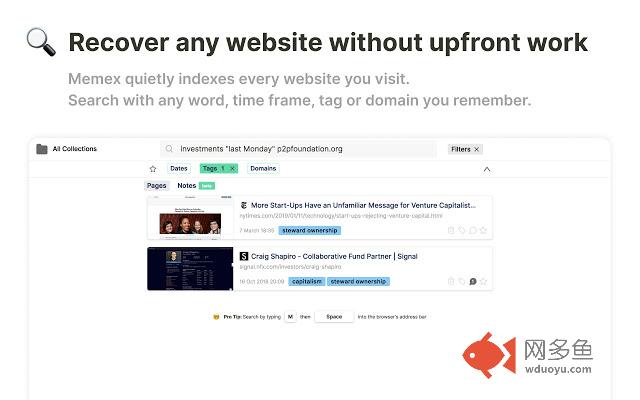
插件概述
Search, annotate and organize what you've read online.插件详情
An open-source and privacy focused extension for people who don't like wasting time on bookmarking, retracing steps or copy-paste work to make notes about their web research.FEATURES:
=========
? Full-text search your web history and bookmarks.
? Highlight and Annotate Websites
? Flexible organisation: Tag & Sort pages into collections + tab manager
⚡️ Quick onboarding. No signup necessary. Import from every major bookmarking service
? Offline-first. All data is stored on your device. Full Privacy & Open-Source
⛅ Backup (and soon sync) your data to any of your favourite cloud providers
HOW TO USE
=============
?Search: Type in 'm' followed by pressing the 'space' bar or tab in the address bar.
?Annotate: Highlight any piece of text and use the tooltip
?Organise: Move with the mouse to the right side of the screen, or click on the little 'brain' icon in the extension bar
FEEDBACK and TROUBLESHOOTING
============================
To leave bug reports and feature requests: worldbrain.io/help
Support email: support@worldbrain.io
Chat with the team: worldbrain.io > the chat bubble in the bottom right corner
If Memex causes issues, there is this trick as old as computer service people are around:
Have you tried restarting the extension? ?
You can do so via chrome://extensions.
If a problem persists, keep the extension deactivated and drop by in our help section (above).
When deactivated then does not need RAM or CPU.
其他信息
官方唯一标识:abkfbakh****************ioombali
官方最后更新日期:2019年6月24日
分类:生产工具
大小:12.75MiB
版本:1.3.0
语言:English
提供方:https://worldbrain.io
星级:4.1
插件下载
| 下载链接一 下载链接二 |
| Chrome插件离线安装教程 |
温馨提示
本站中的部份内容来源网络和网友发布,纯属个人收集并供大家交流学习参考之用,版权归版权原作者所有。
如果您发现网站上有侵犯您的知识产权的作品,请与我们取得联系,我们会及时修改或删除。
如果您觉得网多鱼对您有帮助,欢迎收藏我们 Ctrl+D。