TimeYourWeb Time Tracker
插件截图
插件概述
The most detailed online time statistics. Know how much time you spend on any site on any day.插件详情
You need TimeYourWeb, if:* You spend a considerable part of your life on the Internet and would like to know how this time is effective. Your lifetime is a too valuable resource to spend it uncontrollably.
* You want to use Internet resources more efficiently. The first step towards change is aware of the current situation. TimeYourWeb is an impartial judge, to track your online activity. You'll know how long you loaf in social networks or spend time educational portals.
* As a parent you care about which sites your child is. Note that TimeYourWeb - this is not a program for parental control. TimeYourWeb does not guarantee that the child does not go to the "bad" sites. TimeYourWeb can be temporarily disabled or he can user a browser without this extension. However, TimeYourWeb helps to know that the user really was on "good" sites and confirm his activity on them.
* You are an employer and want to make workers more conscious attitude to time they spend on the Internet. Installing TimeYourWeb increases their efficiency of web usage.
* You are a freelancer. So TimeYourWeb will help you draw up a detailed report on how you spent your working time online.
TimeYourWeb chrome extension will give you the most detailed time statistics
- see how much time you spend on each page of any domain and DOWNLOAD this information as CSV
- distinguish "active" and "total" time duration spent on any page
- see when you starts and how long you are watching any page. You can also DOWNLOAD this information as CSV
- see how your Internet activity changes during any month
TimeYourWeb extension is without any ads completely. With TimeYourWeb you can manage your time and enjoy your effective work.
Summary Chart
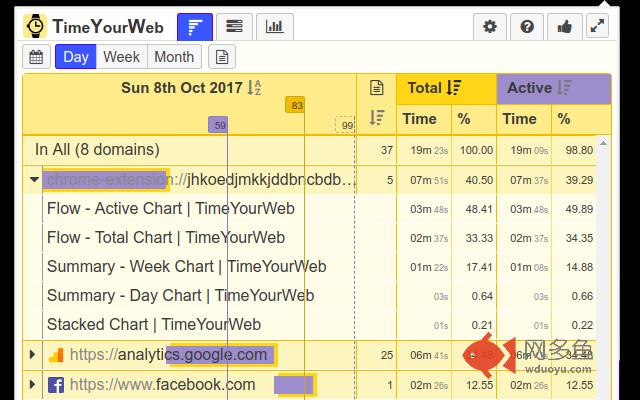
You can get a summary for sites you have visited per a day / a week / a month.
TimeYourWeb tracks time only when your browser has a focus.
The extension distinguishes "Total" and "Active" time tracking approaches. Time is tracked as "Active" if you press keys or move the mouse more often than 1 time in 30 seconds. If a user is inactive more than 30 seconds but the browser is in focus, TimeYourWeb counts only "Total" time. "Total" time shows you how long you were watching video on YouTube or other video-sharing sites or just kept your browser opened.
TimeYourWeb allows you to order summary data by "Total" or by "Active" time or site names.
Click by any page opens visited page in new chrome tab. Also you can download information from this tab as CSV.
Flow Chart
With Flow Chart - you can investigate your Internet activity stats like under the microscope. It shows your online
activity on timeline. You can switch between "Total" and "Active" time tracking approaches
(see Summary Chart about tracking approaches).
Here you can see when you visited a page and how long you were there.
Pages from the same domain have the same color.
Also you can download information from this tab as CSV.
Stacked Chart
Stacked Chart gives bird's-eye view to your Internet activity statistics. Here you can see how your habits change
during a month. You see the longest and the shortest day on the Internet during a month.
Configuration
Allows you to:
1) stop/start time tracking
2) set the day of week start. It could be Saturday, Sunday or Monday. Monday is default.
3) define URLs that won't be tracked. TimeYourWeb checks each URL for correspondence to "Ignoring rules". If URL start and "Ignoring rule" are equal then URL will be ignored.
Ignoring Rules examples:
- "https://mail.google.com/mail/u/0/?tab=wm#spam" - don't track time spent on spam checking in Gmail.
- "https://mail.google.com" - do not track any activity in Gmail
- "chrome://newtab" - don't track time spent on new Tab
- "file://" - don't track time spent on any local file
FAQ
Question: Does it track the time when I watch a film online?
Answer: Yes, if browser is in focus. "Total" Time shows the period you was watching the film.
Question: Does TimeYourWeb have any access to viewed pages?
Answer: No, it doesn't. TimeYourWeb only tracks URLs visited by you, no more.
Question: Is TimeYourWeb free?
Answer: All current and most future features of TimeYourWeb are free and will be free forever.
However, we are going to add some useful features which need servers. Server time costs money.
So this features will be paid.
Future plans
We are going to expand TimeYourWeb with next capabilities:
- possibility for deleting day data
- user accounts with authentication
- synchronization between several computers
Permissions
TimeYourWeb is the lowest permission required among another Chrome extension time trackers.
TimeYourWeb requires "Read you browsing history": to allow the extension to read current tab's domain, icon and title.
Contacts
Email: timeyourweb[ at ]gmail.com
其他信息
官方唯一标识:kfmlkgch****************lldbcpnh
官方最后更新日期:2018年9月10日
分类:生产工具
大小:1.48MiB
版本:1.0.21
语言:English
提供方:timeyourweb.com
星级:4.6
插件下载
| 下载链接一 下载链接二 |
| Chrome插件离线安装教程 |
温馨提示
本站中的部份内容来源网络和网友发布,纯属个人收集并供大家交流学习参考之用,版权归版权原作者所有。
如果您发现网站上有侵犯您的知识产权的作品,请与我们取得联系,我们会及时修改或删除。
如果您觉得网多鱼对您有帮助,欢迎收藏我们 Ctrl+D。