Streamkeys
插件截图
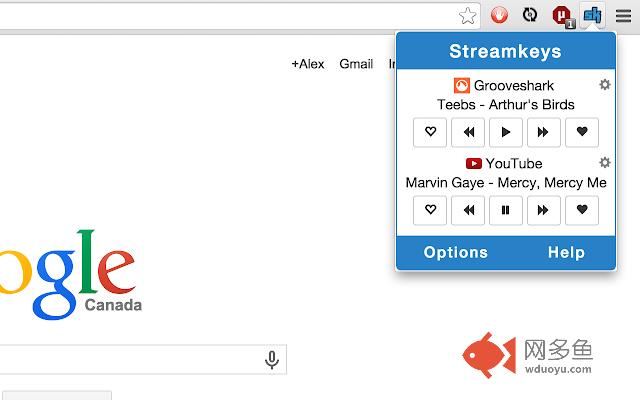
插件概述
Global hotkeys for online music players including support for media keys.插件详情
If the hotkeys are not working for you verify that they are set in the extension tab. To do that, click on the chrome menu (3 horizontal stripes on top right) and go to tools -> extensions. Scroll to the bottom of the page and click on "Keyboard shortcuts". From that popup you can change the keys to those of your choosing.This extension enables you to control the basic features of online media player hotkeys via global hotkeys. Pressing a hotkey will trigger an action in the media player's tab. There are 4 actions bound to the following default hotkeys:
Play/Pause: Media key play/pause
Play Next: Media key next
Play Previous: Media key previous
Mute: Ctrl + Shift + 2
Support for the following features can also be bound to hotkeys by the user (or controlled though the popup):
Like
Dislike
Stop
You can change the hotkeys from the Chrome extension tab. To get there click on : Settings icon (three horizontal lines on top right of browser) => Tools => Extensions => Keyboard shortcuts (link at bottom of page)
If you have any suggestions for more media players to add for the next release let me know! alex@aegabriel.com
The source code is available here: https://github.com/berrberr/streamkeys.
其他信息
官方唯一标识:ekpipjof****************nahaneen
官方最后更新日期:2019年6月15日
分类:生产工具
大小:680KiB
版本:1.8.0
语言:English
提供方:streamkeys.com
星级:4.6
插件下载
| 下载链接一 下载链接二 |
| Chrome插件离线安装教程 |
温馨提示
本站中的部份内容来源网络和网友发布,纯属个人收集并供大家交流学习参考之用,版权归版权原作者所有。
如果您发现网站上有侵犯您的知识产权的作品,请与我们取得联系,我们会及时修改或删除。
如果您觉得网多鱼对您有帮助,欢迎收藏我们 Ctrl+D。