Record and Metadata Comparator for Salesforce
插件截图
插件概述
Compare Record data values and object metadata in Salesforce插件详情
Compare Object Metadata and it's record values in Salesforce and see all differences in just four clicks!Note: All credits to sorenkrabbe for his extension "salesforce-inspector" available @ https://chrome.google.com/webstore/detail/salesforce-inspector/aodjmnfhjibkcdimpodiifdjnnncaafh
I have used the code shared by him to improvise and develop this extension. I would share the code of this extension on github soon.
This extension compares any two objects or its records (could be from same org or different orgs) and highlights all the differences found. It can show you the following
- Which fields are missing in target org.
- Which fields are missing in source org
- which fields have metadata difference (change in formula, datatype , required etc.)
- which fields have data value mismatch
Please watch the video tutorial available @ http://youtu.be/mkarbbYWveY to understand the exact functionality and its uses.
Steps to compare Object Metadata:
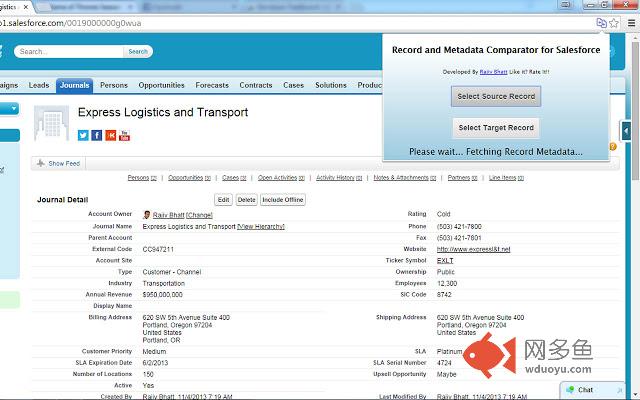
1. Open up the custom object definition or it's list view or any of it's record in salesforce. This is your source record. Click on the extension icon and then click on the "Select Source Record" button.
2. After that, open up the custom definition of the same object or it's list view or the record (could be from same org or different org). This is your target record. Click on the extension icon and then click on the "Select Target record" button.
3. The extension would create a popup and in that show you all the differences that were found.
Steps to compare Record Values:
1. open any record from a standard/custom object in one org. This is your source record. Click on the extension icon and then click on the "Select Source Record" button.
2. After that, open up any other record for the same object (could be from same org or different org). This is your target record. Click on the extension icon and then click on the "Select Target record" button.
3. The extension would create a popup and in that show you all the differences that were found.
Do recommend the extension with you friends and colleagues if you like it.
Also, if you like the extension, please don't forget to Rate it on the Chrome Extension Webstore.
Feedback/Suggestions/Ideas/Comments most welcome.
Thanks again and I hope this extension saves your time and makes you more productive!
For any queries: rajivashokbhatt+metadatacomparator@gmail.com
其他信息
官方唯一标识:laghgcpe****************lbffaljp
官方最后更新日期:2016年5月18日
分类:生产工具
大小:61.47KiB
版本:0.0.0.7
语言:English
提供方:none
星级:4.7
插件下载
| 下载链接一 下载链接二 |
| Chrome插件离线安装教程 |
温馨提示
本站中的部份内容来源网络和网友发布,纯属个人收集并供大家交流学习参考之用,版权归版权原作者所有。
如果您发现网站上有侵犯您的知识产权的作品,请与我们取得联系,我们会及时修改或删除。
如果您觉得网多鱼对您有帮助,欢迎收藏我们 Ctrl+D。