Qlearly - Tab and Bookmark Manager
插件截图
插件概述
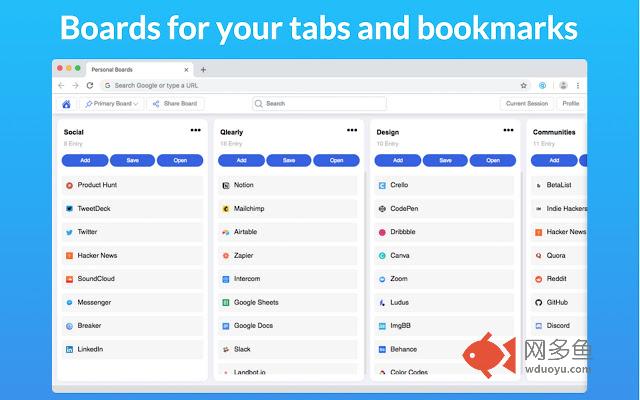
Organize your favorite websites by boards and columns. Every time you open a new tab, your board will load within a second.插件详情
A modern bookmarks and tabs manager. ✨“I don’t want to have 100 tabs open anymore” – from a new Qlearly user
Stop wasting time looking for tabs or bookmarks.
➤ Save tabs in one click
➤ Quick and unified Search
➤ Powerful keyboard shortcuts
➤ Multi device bookmark syncing
➤ Collaborate with your teammates
➤ Create public boards and columns
➤ Unlimited bookmarks, boards and column
Why did we build Qlearly? ?
The primary reason why we built Qlearly is to help you save time and remain organized. As visiting your favorite sites or bookmarking new ones is such a repetitive task, saving seconds can have a drastic impact to your workflow over time.
FEATURES ?
★ Fast bookmarking
Save all or a handful of your tabs to a specific column in the matter of a second by clicking 'save' in a column, or by clicking the extension icon, followed by the board/column and click the 'save session'.
★ Quick and unified Search
To make it easier for you to find the site(s) you are looking for, you can search through all your boards. You can use our keyboard shortcuts to search even faster!
★ Keyboard Shortcuts
We built numerous shortcuts to help you work even faster! You can search, create a new board, new column, save all your opened tabs all within a second.
★ Device Syncing:
By logging into your account on any device support by Qlearly, you will be able to access all your bookmarks. Additional bookmarks you will save will be synced as well.
★ Collaborate with your teammates
Collaborate on a board with an unlimited amount of teammates.
★ Shareable links
You can share a full board or specific columns with anyone by getting a shareable link.
✪ Genuinely enjoy the Qlearly experience? Did it help you save time at work? Support the Qlearly community by giving us a great review!
GET IN TOUCH ?
Twitter: @QlearlyHQ, @Guillaumebardet
Contact: info@qlearly.com or guillaume@qlearly.com
SUPPORT & BUG REPORTING
http://www.Qlearly.com/contact
HELP CENTER
https://help.qlearly.com
其他信息
官方唯一标识:aicaflgm****************plnpjmig
官方最后更新日期:2019年6月18日
分类:生产工具
大小:2.75MiB
版本:2.8
语言:English
提供方:https://qlearly.com
星级:4.7
插件下载
| 下载链接一 下载链接二 |
| Chrome插件离线安装教程 |
温馨提示
本站中的部份内容来源网络和网友发布,纯属个人收集并供大家交流学习参考之用,版权归版权原作者所有。
如果您发现网站上有侵犯您的知识产权的作品,请与我们取得联系,我们会及时修改或删除。
如果您觉得网多鱼对您有帮助,欢迎收藏我们 Ctrl+D。