PrivateMail for Gmail
插件截图
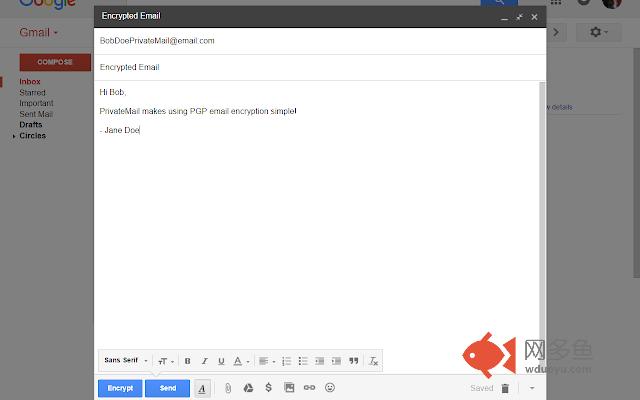
插件概述
A plugin that allows you to send and receive encrypted emails with the Gmail web client.插件详情
PrivateMail for Gmail is an extension that makes it easy to send and receive encrypted emails using mail.google.com. After a quick and easy setup, you will be ready to send PGP encrypted emails. After that, all you need to send an encrypted email is the recipient’s public PGP encryption key. If the recipient doesn't have a PGP encryption key, it’s no problem, PrivateMail lets you invite the recipient to PrivateMail. Once they accept the invitation, you will automatically have their newly created PGP encryption key, and they will have yours.All you need to do to send an encrypted email is write your email as normal, then click the "Encrypt" button. After that, you will see your message replaced with the encrypted version of the message you typed. Now, the only person who can view the original, unencrypted message text is the recipient. Finally, click send as you normally would, and your email will be sent.
Decrypting a message that was sent to you is also easy. When you click on an email that was encrypted using PGP, PrivateMail will try to automatically decrypt the message. If the automatic decryption does not work, then you can always click the "Decrypt" button to force the message to be decrypted if it was formed properly.
其他信息
官方唯一标识:jpeianbf****************ffopkjko
官方最后更新日期:2017年5月10日
分类:生产工具
大小:956KiB
版本:0.0.7
语言:English (United States)
提供方:none
星级:5
插件下载
| 下载链接一 下载链接二 |
| Chrome插件离线安装教程 |
温馨提示
本站中的部份内容来源网络和网友发布,纯属个人收集并供大家交流学习参考之用,版权归版权原作者所有。
如果您发现网站上有侵犯您的知识产权的作品,请与我们取得联系,我们会及时修改或删除。
如果您觉得网多鱼对您有帮助,欢迎收藏我们 Ctrl+D。