Outliner
插件截图
插件概述
Outline the page.插件详情
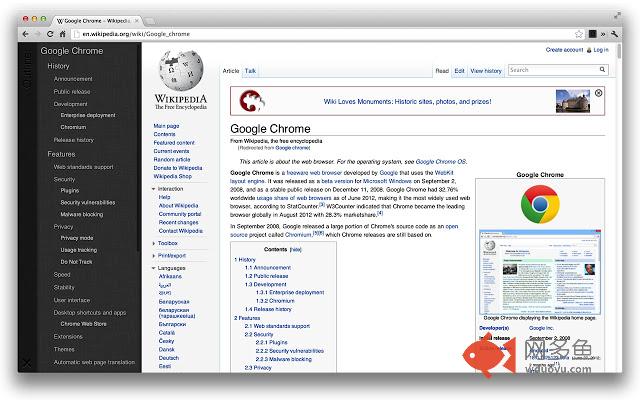
Outliner generates a table of contents by extracting all the headings in the page.Many pages on the Internet do not feature a well-designed in-page navigator. Outliner is here to help.
How to use
----
1. Click the Outliner button beside your address bar to activate it. You will see a box coming from left with the outline in it.
2. Click on any of the headings in the outline to jump to the corresponding section on the page.
3. Click the cross button on the bottom left to close the outline.
Privacy
----
Outliner needs access to "your data on all websites" and "your tabs and browsing activity" in order to inject the outline into your tabs. It does not track your data or activity in any way.
Feedback
----
If you discover that Outliner does not work well in some pages, please send me the link, and I'll try my best to fix that ;)
Any feedback is welcomed, but if you expect my response (and you probably do), please post them on the feedback page or on GitHub, because I cannot respond to your web store review in any way!
License
----
Outliner is released under the MIT license.
https://github.com/scottcheng/outliner
其他信息
官方唯一标识:kdabjjgk****************kdpdmodp
官方最后更新日期:2012年10月1日
分类:生产工具
大小:75.71KiB
版本:1.0.2
语言:English
提供方:none
星级:3.6
插件下载
| 下载链接一 下载链接二 |
| Chrome插件离线安装教程 |
温馨提示
本站中的部份内容来源网络和网友发布,纯属个人收集并供大家交流学习参考之用,版权归版权原作者所有。
如果您发现网站上有侵犯您的知识产权的作品,请与我们取得联系,我们会及时修改或删除。
如果您觉得网多鱼对您有帮助,欢迎收藏我们 Ctrl+D。