Omnibox Timer
插件截图
插件概述
A simple timer built for Chrome插件详情
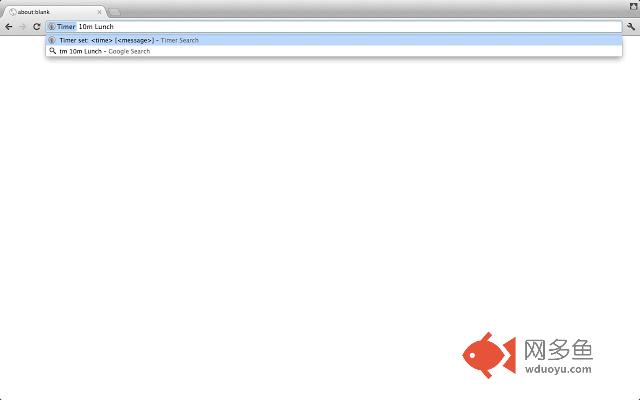
You can set timers from the omnibox. It is good for Keyboard lovers. Type 'tm' and space, then you can set the timer from the omnibox. When time is over, Chrome will show a desktop notification and tell you a message you entered. The default message is 'Timer done!'.Please send me feedbacks! If you find any bugs or have new feature requests, please click 'Send Feedback' from 'DETAILS' page and enter feedback there.
# Timer commands
* `10 Lunch` : the default unit is minute. This timer will ring in 10 minutes.
* `30s` : 30 seconds
* `20m Go home` : 20 minutes
* `1h meeting` : 1 hour
# More commands
* `show` or `options` : opens Options page. This page shows timers you created, statistics and options you can select.
# UI
* Browser Action
* You will see Omnibox Timer icon next to Omnibox.
* Hide: If you right-click the icon, you can see an option to hide this icon.
* Click: if you click the icon, chrome will open Options page.
* Feedback: you will see 'add' or 'error' from the icon when you type any commands to Omnibox Timer.
* Options
* This page shows timers you created, statistics and options you can select.
* You can open this page from Omnibox command, Browser Action icon or Chrome Settings page.
* You can select TTS or Bell for sound option.
* You can select how to suggest timer texts: 'Most recently used timer first' or 'Most frequently used timer first'.
# Releases
* 0.5.0: Add an option for `no sound`. (Thanks @nocaoper https://github.com/nocaoper)
* 0.4.2: Patches to use new window.Notification API. (Thanks @sunaku https://github.com/sunaku)
* 0.4.1: Patches to use new chrome.notifications API. (Thanks @sunaku https://github.com/sunaku)
* 0.4.0
* Fixed UI issues after Chrome updates
* Now Omnibox Timer suggests the text you previously typed.
* You can see an example here: https://raw.githubusercontent.com/taicki/omnibox-timer/master/history.gif
* You can select how to suggest timer texts: 'Most recently used timer first' or 'Most frequently used timer first'.
* 0.3.1: Reduce permission requirements.
* 0.3: You can choose TTS or Bell from Options page. After you enter commands, you will see the feedback from Browser Action icon.
* 0.2: New options page is introduced!
* 0.1.2: Upgrade to manifest version 2 (Thanks to @sukima https://github.com/sukima )
* 0.1.1: Please click anywhere in notifications to close them.
其他信息
官方唯一标识:iooaeaog****************omlkaaif
官方最后更新日期:2017年3月12日
分类:生产工具
大小:420KiB
版本:0.5.0
语言:English (United States)
提供方:none
星级:3.6
插件下载
| 下载链接一 下载链接二 |
| Chrome插件离线安装教程 |
温馨提示
本站中的部份内容来源网络和网友发布,纯属个人收集并供大家交流学习参考之用,版权归版权原作者所有。
如果您发现网站上有侵犯您的知识产权的作品,请与我们取得联系,我们会及时修改或删除。
如果您觉得网多鱼对您有帮助,欢迎收藏我们 Ctrl+D。